Pages

Wednesday, December 14, 2016

User accounts with “User must change password at next logon” are unable to log into Citrix XenApp or XenDesktop via the NetScaler portal

Problem

You’ve noticed that Active Directory user accounts with User must change password at next logon:

imageimage

… are unable to log into Citrix XenApp or XenDesktop via the NetScaler portal as the following error is presented:

Incorrect user name or password.

image

Solution

Two of the common reasons that could cause this behavior are as follows:

#1 – LDAP Servers are not configured with LDAPS

image

Note that the Security Type in the screenshot below is configured as SSL and the port is 636:

image

#2 – LDAP Servers does not have “Allow Password Change” enabled

Note the Allow Password Change option in the screenshot below that allows for password changes:

image

Once this option is enabled, the user will now be prompted with the following page to change their password:

image

Tuesday, December 13, 2016

A few virtual desktop Microsoft Office 2016 GPO First Run and Optimization Settings

The following are a few Microsoft Office 2016 optimization settings I’ve been using for clients to disable annoying first run wizards and visual enhancements that could potentially slow down performance.

image

User Configuration > Policies > Administrative Template > Microsoft Office 2016 > First Run >

Disable First Run Movie: Enabled

Disable Office First Run on application boot: Enabled

image

User Configuration > Policies > Administrative Template > Microsoft Office 2016 > Global Options > Customize

Menu animations: Disabled

image

User Configuration > Policies > Administrative Template > Microsoft Office 2016 > Miscellaneous

Disable Office animations: Enabled

Disable Office Backgrounds: Enabled

Disable web view in the Office file dialog boxes: Enabled

Do not use hardware graphics acceleration: Enabled

image

User Configuration > Policies > Administrative Template > Microsoft Office 2016 > Microsoft Office 2016 > Privacy > Trust Center

Disable Opt-in Wizard on first run: Enabled

image

I will continue to append to this post in the future.

Monday, December 12, 2016

Disabling the favorites tab displayed in Citrix StoreFront 3.7.0.39

A few of my colleagues and clients have referenced one of my previous blog post:

Disabling tabs displayed in Citrix StoreFront 3.x
http://terenceluk.blogspot.com/2015/12/disabling-tabs-displayed-in-citrix.html

… and indicated that they would like to hide the Favorites tab:

image

… but they are unable to find the Disable User Subscriptions option on the right of the Citrix StoreFront administration console:

image

What I’ve noticed is that the newer StoreFront builds such as 3.7.0.39:

image

… no longer displays this option and has nested in Configure Store Settings:

image

then under User Subscriptions:

image

Thursday, December 8, 2016

VMware vSphere 5.5 sysprep customization never completes and fails for virtual machine

I recently ran into an extremely strange issue at a client’s environment that a VMware support engineer never managed to resolve and it was only by chance that I was able to figure out a workaround.  The likelihood of running into this issue again is probably quite low but I thought I’d write this blog post in case anyone else comes across it as I did.

Problem

You’ve noticed that deploying virtual machines from template with customization specifications no longer complete and result with the following error in VMware View when attempting to deploy full clone VDIs:

Customization operation timed out

Pariing state: In pairing…

image

Reviewing the full clone virtual machine logs show the start of customization:

Started customization of virtualMachine.

Customization log located at C:\Windows\TEMP\vmware-imc\guestcust.log in the guest OS.

image

Reviewing the guestcust.log does not show any errors:

image

Solution

While the problem described above can be caused by many reasons, the reason I encountered a few weeks ago was one that I would have never guessed.  What caused the customization process to fail in this environment I had to troubleshoot in was that the ESXi version was from a release date that was later than the vCenter version.

The ESXi version in this environment was 5.5.0, 3568722

The vCenter version in this environment was 5.5.0, 3252642

Using the information provided by the following KBs:

Build numbers and versions of VMware ESXi/ESX (2143832)
https://kb.vmware.com/selfservice/search.do?cmd=displayKC&docType=kc&docTypeID=DT_KB_1_1&externalId=2143832

Build numbers and versions of VMware vCenter Server (2143838)
https://kb.vmware.com/selfservice/search.do?cmd=displayKC&docType=kc&docTypeID=DT_KB_1_1&externalId=2143838

Will show the following information for the ESXi host and vCenter:

Version: ESXi 5.5 Express Patch 10
Release Date: 2016-02-22
Build Number: 3568722

Version: vCenter Server 5.5 Update 3b
Release Date: 2015-12-08
Build Number: 3252642

To correct the issue, update vCenter to a version with a later release date than the ESXi host and note that having the vCenter version newer than the ESXi host is best practice.

If upgrading the host is not an option, a strange workaround I noticed was that the customization would complete successfully if I disable HA on the cluster:

image

I’m not sure if this is specific to this environment but if there are no other options, try temporarily disabling HA and see if a new cloned VM would complete the customization.

Wednesday, December 7, 2016

Unable to reconfigure HA on VMware ESXi 5.5.0 hosts after failed vCenter upgrade

Problem

You’ve recently attempted to upgrade vCenter 5.5 from 3b to 3e but had to rollback the upgrade to a previous snapshot due to an issue.  Since the upgraded vCenter server was briefly started and had upgraded the HA agents on the ESXi hosts, you now see alarms thrown for the cluster as well as the hosts. The following is one of those errors:

Configuration Issues

There was an error unconfiguring the vSphere HA agent on this host. To solve this problem, connect the host to a vCenter Server of version 5.0 or later.

image

Attempting to use the Reconfigure for vSphere HA feature on the hosts fails and disabling then re-enabling HA on the cluster also fails.

Solution

To resolve this issue, the first step to try is disable HA on the cluster then follow instructions for reinstalling the HA agent as outlined in the following KB:

Verifying and reinstalling the correct version of the VMware vCenter Server agents (1003714)
https://kb.vmware.com/kb/1003714

Since the environment shown above is ESXi 5.5, the following commands were executed:

~ # cd opt/vmware/uninstallers/

/opt/vmware/uninstallers # ls

VMware-fdm-uninstall.sh

/opt/vmware/uninstallers # cp /opt/vmware/uninstallers/VMware-fdm-uninstall.sh /tmp

/opt/vmware/uninstallers # chmod +x /tmp/VMware-fdm-uninstall.sh

/opt/vmware/uninstallers # /tmp/VMware-fdm-uninstall.sh

/opt/vmware/uninstallers #

image

If completing the above continues to throw the same error, proceed and try to use the following commands to manually remove the FDM VIB:

~ # esxcli software vib list | grep -i fdm

vmware-fdm 5.5.0-3252642 VMware VMwareCertified 2016-06-23

~ # esxcli software vib remove -n vmware-fdm

Removal Result

Message: Operation finished successfully.

Reboot Required: false

VIBs Installed:

VIBs Removed: VMware_bootbank_vmware-fdm_5.5.0-3252642

VIBs Skipped:

~ #

~ # esxcli software vib list | grep -i fdm

~ #

image

Once completed, restart the host and attempt to re-enable HA on the cluster to configure the hosts.

Tuesday, December 6, 2016

Attempting to run Setup or Remove Skype for Business Server Components again throws the error: “HostLocalActivateTask execution failed on an unrecoverable error.”

Problem

You’ve recently made a change to your Skype for Business topology and need to run the Setup or Remove Skype for Business Server Components again to apply the changes:

image

… but notice that it fails with the error:

HostLocalActivateTask execution failed on an unrecoverable error.

The following is the output commands executed:

> Bootstrap-CsComputerLogging status to: C:\Users\tluk\AppData\Local\Temp\BootstrapFull-[2015_09_04][11_33_12].htmlChecking prerequisites for bootstrapper...Checking prerequisite WMIEnabled...prerequisite satisfied.Checking prerequisite NoBootstrapperOnBranchOfficeAppliance...prerequisite satisfied.Checking prerequisite SupportedOS...prerequisite satisfied.Checking prerequisite NoOtherVersionInstalled...prerequisite satisfied.Host name: svrskypestd01.ariel.internalDisabling unused roles...Executing PowerShell command: Disable-CSComputer -Confirm:$false -Verbose -Report "C:\Users\tluk\AppData\Local\Temp\Disable-CSComputer-[2015_09_04][11_33_16].html"Checking prerequisites for roles...Checking prerequisite SupportedOS...prerequisite satisfied.Checking prerequisite SupportedOSNoDC...prerequisite satisfied.Checking prerequisite DotNet35...prerequisite satisfied.Checking prerequisite SupportedSqlRtcLocal...prerequisite satisfied.Checking prerequisite WMIEnabled...prerequisite satisfied.Checking prerequisite NoOtherVersionInstalled...prerequisite satisfied.Checking prerequisite PowerShell...prerequisite satisfied.Checking prerequisite SupportedServerOS...prerequisite satisfied.Checking prerequisite KB2533623Installed...prerequisite satisfied.Checking prerequisite SupportedSqlLyncLocal...prerequisite satisfied.Checking prerequisite SupportedSqlRtc...prerequisite satisfied.Checking prerequisite IIS...prerequisite satisfied.Checking prerequisite IIS7Features...prerequisite satisfied.Checking prerequisite KB2982006Installed...prerequisite satisfied.Checking prerequisite ASPNet...prerequisite satisfied.Checking prerequisite KB2646886Installed...prerequisite satisfied.Checking prerequisite BranchCacheBlock...prerequisite satisfied.Checking prerequisite WCF...prerequisite satisfied.Checking prerequisite WindowsMediaFoundation...prerequisite satisfied.Checking prerequisite SqlUpgradeInstanceRtcLocal...prerequisite satisfied.Checking prerequisite SqlInstanceRtcLocal...prerequisite satisfied.Checking prerequisite VCredist...prerequisite satisfied.Checking prerequisite SqlNativeClient...prerequisite satisfied.Checking prerequisite SqlClrTypes...prerequisite satisfied.Checking prerequisite SqlSharedManagementObjects...prerequisite satisfied.Checking prerequisite UcmaRedist...prerequisite satisfied.Checking prerequisite KB2858668Installed...prerequisite satisfied.Checking prerequisite VcRedistForWinFab...prerequisite satisfied.Checking prerequisite WinFabForWin2012...prerequisite satisfied.Checking prerequisite MicrosoftIdentityExtensions...prerequisite satisfied.Checking prerequisite SqlUpgradeInstanceLyncLocal...prerequisite satisfied.Checking prerequisite SqlInstanceLyncLocal...prerequisite satisfied.Checking prerequisite SqlUpgradeInstanceRtc...prerequisite satisfied.Checking prerequisite SqlInstanceRtc...prerequisite satisfied.Checking prerequisite RewriteModule...prerequisite satisfied.Checking prerequisite TenantPowershell...prerequisite satisfied.Installing any collocated databases...Executing PowerShell command: Install-CSDatabase -Confirm:$false -Verbose -LocalDatabases -Report "C:\Users\tluk\AppData\Local\Temp\Install-CSDatabase-[2015_09_04][11_33_28].html"Enabling new roles...This step will configure services, apply permissions, create firewall rules, etc.Executing PowerShell command: Enable-CSComputer -Confirm:$false -Verbose -Report "C:\Users\tluk\AppData\Local\Temp\Enable-CSComputer-[2015_09_04][11_33_39].html"HostLocalActivateTask execution failed on an unrecoverable error.

image

The following output is found in the bootstrap log: 

Error: HostLocalActivateTask execution failed on an unrecoverable error.

▼ Details

└ Type: PowerShellException

└ ▼ Stack Trace

└

at Microsoft.Rtc.Internal.Tools.Bootstrapper.Dependencies.PowerShellProvider.RunCmdlet(String cmdlet)
at Microsoft.Rtc.Management.Internal.Utilities.LogWriter.InvokeAndLog(Action action)

└ ▼ Additional Details

└

Error: HostLocalActivateTask execution failed on an unrecoverable error.

▼ Details

└ Type: PowerShellException

└ ▼ Stack Trace

└

at Microsoft.Rtc.Internal.Tools.Bootstrapper.Dependencies.PowerShellProvider.HandlePowerShellErrors(Collection`1 errors)
at Microsoft.Rtc.Internal.Tools.Bootstrapper.Dependencies.PowerShellProvider.RunCmdlet(String cmdlet)

image

You’ve confirmed that all the services are started:

image

Solution

To determine why this error is thrown during the setup process, execute the cmdlet Enable-CSComputer:

PS C:\Users\tluk> Enable-CSComputer

Enable-CSComputer : HostLocalActivateTask execution failed on an unrecoverable

error.

At line:1 char:1

+ Enable-CSComputer

+ ~~~~~~~~~~~~~~~~~

+ CategoryInfo : InvalidOperation: ([0] Microsoft.R....Core.Servi

ce

:SourceCollection) [Enable-CsComputer], DeploymentException

+ FullyQualifiedErrorId : TaskFailed,Microsoft.Rtc.Management.Deployment.A

ctivateMachineCmdlet

WARNING: No patterns found. Skipping rewrite rules creation for Web Scheduler

WARNING: No patterns found. Skipping rewrite rules creation for Web Scheduler

WARNING: Enable-CSComputer encountered errors. Consult the log file for a

detailed analysis, and ensure all errors (6) and warnings (2) are addressed

before continuing.

WARNING: Detailed results can be found at

"C:\Users\tluk\AppData\Local\Temp\Enable-CSComputer-5a75cbdc-d306-4a43-b38f-9b8

0305cc469.html".

PS C:\Users\tluk>

image

Review the log Enable-CSComputer-xxxxx-xxx-xxx.html that the cmdlet generates and look for an error similar to the following:

Error: The service name “<serviceName>” is already in use

An example of this could be:

Error: The service name “RTCATS” is already in use

Once the service is confirmed, execute the cmdlet sc delete RTCATS to remove the service:

image

Restart the server then proceed to rerun the Setup or Remove Skype for Business Server Components again:

image

Monday, December 5, 2016

Attempting to upgrade Citrix StoreFront 2.6.0.5031 (Xenpp 7.6) to 3.7.0.39 (XenApp 7.11) fails with: “An error occurred during installation. Please ensure all the required prerequisites have been installed an run the installer again.”

Problem

You’re attempting to upgrade your XenApp 7.6 environment to 7.11 but noticed that the upgrade for Citrix StoreFront 2.6.0.5031:

image

… to 3.7.0.39 fails with:

StoreFront did not install

An error occurred during the installation.

StoreFront failed.

Citrix StoreFront 3.7.0.39 failed.

An error occurred during installation. Please ensure all the required prerequisites have been installed an run the installer again.

image

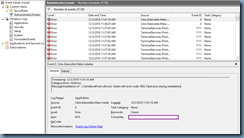
Reviewing the Application log events show the following error logged:

Log Name: Application

Source: Citrix Extensible Meta-Install

Event ID: 0

Level: Error

Message:

Timestamp: 12/3/2016 11:41:18 AM

Category:Error, WinError

Message:Installation of '..\CitrixStoreFront-x64.msi' failed with error code 1603. Fatal error during installation
image

Reviewing the installation log CitrixMsi-CitrixStoreFront-x64-2016-12-03-11-41-06.log file does not provide a reason why the installation failed other than indicating that it did:

Property(S): OutOfNoRbDiskSpace = 0

Property(S): PrimaryVolumeSpaceAvailable = 0

Property(S): PrimaryVolumeSpaceRequired = 0

Property(S): PrimaryVolumeSpaceRemaining = 0

Property(S): INSTALLLEVEL = 1

MSI (s) (98:E8) [11:41:18:642]: Note: 1: 1708

MSI (s) (98:E8) [11:41:18:642]: Product: Citrix StoreFront -- Installation failed.

MSI (s) (98:E8) [11:41:18:643]: Windows Installer installed the product. Product Name: Citrix StoreFront. Product Version: 3.7.0.39. Product Language: 1033. Manufacturer: Citrix Systems, Inc.. Installation success or error status: 1603.

MSI (s) (98:E8) [11:41:18:650]: Deferring clean up of packages/files, if any exist

MSI (s) (98:E8) [11:41:18:650]: MainEngineThread is returning 1603

MSI (s) (98:F0) [11:41:18:653]: RESTART MANAGER: Session closed.

MSI (s) (98:F0) [11:41:18:655]: RESTART MANAGER: Session closed.

MSI (s) (98:F0) [11:41:18:655]: No System Restore sequence number for this installation.

=== Logging stopped: 12/3/2016 11:41:18 ===

MSI (s) (98:F0) [11:41:18:662]: User policy value 'DisableRollback' is 0

MSI (s) (98:F0) [11:41:18:662]: Machine policy value 'DisableRollback' is 0

MSI (s) (98:F0) [11:41:18:662]: Incrementing counter to disable shutdown. Counter after increment: 0

MSI (s) (98:F0) [11:41:18:662]: Note: 1: 1402 2: HKEY_LOCAL_MACHINE\Software\Microsoft\Windows\CurrentVersion\Installer\Rollback\Scripts 3: 2

MSI (s) (98:F0) [11:41:18:663]: Note: 1: 1402 2: HKEY_LOCAL_MACHINE\Software\Microsoft\Windows\CurrentVersion\Installer\Rollback\Scripts 3: 2

MSI (s) (98:F0) [11:41:18:663]: Decrementing counter to disable shutdown. If counter >= 0, shutdown will be denied. Counter after decrement: -1

MSI (s) (98:F0) [11:41:18:663]: Destroying RemoteAPI object.

MSI (s) (98:10) [11:41:18:663]: Custom Action Manager thread ending.

MSI (c) (A8:D8) [11:41:18:665]: Decrementing counter to disable shutdown. If counter >= 0, shutdown will be denied. Counter after decrement: -1

MSI (c) (A8:D8) [11:41:18:666]: MainEngineThread is returning 1603

=== Verbose logging stopped: 12/3/2016 11:41:18 ===

image

Solution

While there could be various reasons as to why this error would be thrown during the upgrade of StoreFront to 3.7, one of the reasons that could cause this is if you have applied customizations to the UI of the legacy 2.6 StoreFront.  The environment above environment had the following customization applied so that allow the applications were displayed and placed into appropriate folders:

https://www.citrix.com/blogs/2014/06/23/receiver-for-web-folder-view/

The links to the ReceiverForWebFolderView.zip package in the above blog post no longer work so if you come across an environment with these customizations applied and not sure how it is configured, the following are the files bundled in the package:
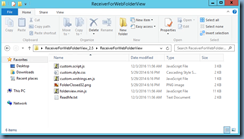
image

The ReadMe.txt file contains the following instructions:

This folder contains customization files for Citrix Receiver for Web 2.5 to provide a folder view for a mandatory store:

custom.script.js

custom.style.css

custom.wrstrings.en.js

FolderClosed32.png

folderview.min.js

If you have not customized your Receiver for Web site, simply copy all the files to the contrib folder of your site.

If you have modified any of custom.script.js, custom.style.css and custom.wrstrings.en.js, you have to manually merge the files in the folder with your modified files and copy the remaining files.

In addition, if you need to support other languages, you have to translate the string "Main" and insert the translated string into custom.wrstrings.<lang-code>.js.

Disclaimer

==========

THESE FILES ARE PROVIDED "AS IS" WITHOUT WARRANTIES OF ANY KIND, EXPRESS OR IMPLIED. CITRIX SYSTEMS, INC. ("CITRIX"), SHALL NOT BE LIABLE FOR TECHNICAL OR EDITORIAL ERRORS OR OMISSIONS CONTAINED HEREIN, NOR FOR DIRECT, INCIDENTAL, CONSEQUENTIAL OR ANY OTHER DAMAGES RESULTING FROM THE FURNISHING, PERFORMANCE, OR USE OF THESE FILES, EVEN IF CITRIX HAS BEEN ADVISED OF THE POSSIBILITY OF SUCH DAMAGES IN ADVANCE.

image

The following files located in C:\inetpub\wwwroot\Citrix\<yourCitrixSite>Web\contrib  are the ones that were replaced:

  • custom.script.js
  • custom.style.css
  • custom.wrstrings.en.js
  • FolderClosed32.png
  • folderview.min.js

The easiest way to get the original UI back is simply navigate to the \contrib folder of a Citrix StoreFront site that wasn’t customized and copy the files back over.  If there are no additional StoreFront sites to use then create a new temporary one and copy the files over and ensure that are not additional files or folders left:

image

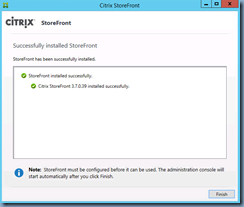
Once the files are over, restart the StoreFront server (an iisreset does not appear to be enough), rerun the upgrade and process should now complete:
image