I’ve recently been asked by a client whether there was a way to disable the Do Not Send a Response option within Outlook 2010 and Outlook 2016 because the Response column in the View Tracking Status does not get updated unless the user chooses to send a response:


After doing a bit of research on forums about this topic, it appears many users have complained about sending a response because it would lead to mailbox clutter for the meeting organizer and the proposed solution is to turn on the Update tracking information, and then delete response that don’t contain comments option in the File > Options > Mail > Tracking settings:
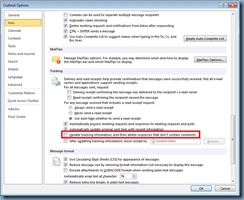
While this helped with encouraging users to send a response, the client still wanted to disable the Do Not Send a Response option and after a bit more digging, I found the solution in this forum post:
https://social.technet.microsoft.com/Forums/office/en-US/5861d690-aae8-4f37-a9e6-687984fb2540/how-to-disable-meeting-response-action-do-not-respond?forum=outlook
The setting to disable the option is in User Configuration > Polices > Administrative Templates > Microsoft Outlook 2010 > Disable Items in User Interface > Custom
Proceed and enable the setting Disable command bar buttons and menu items and then enter the following command bar ID:

Apply this GPO to the user accounts that require this configuration and users should see the following when attempting to accept a meeting:

I’ve also tested this with Outlook 2016 and can confirm that the same settings with the Office 2016 policy templates yield the same result.

![clip_image002[5]](https://blogger.googleusercontent.com/img/b/R29vZ2xl/AVvXsEgzb-vG6Rmw64VwqL6ip8VlDVFoYdYfkI6o3xPobEzr2CaUJY9f0TCHU7Z1eM-63ygd09xIJ6-7SW96GslMwdSzniKJpPbzJqmO4DEIP0Mw4O8IxzA9YBAryQbEvZz2FuhnLrMCxlXXixOH/s1600-h/clip_image002%25255B5%25255D%25255B3%25255D.jpg "clip_image002[5]")


