Pages

Showing posts with label Exchange 2007. Show all posts

Wednesday, January 4, 2017

Microsoft Remote Connectivity Analyzer’s Exchange ActiveSync test fails at “Validating certificate trust for Windows Mobile devices.” when publishing Exchange 2016 services with Citrix NetScalers

Problem

You’ve successfully published your Exchange 2016 services with Citrix NetScalers but noticed that when you run the Microsoft Remote Connectivity Analyzer’s Exchange ActiveSync test at https://testconnectivity.microsoft.com, it fails at the Validating certificate trust for Windows Mobile devices. test.

image

The Microsoft Connectivity Analyzer is testing Exchange ActiveSync.

The Exchange ActiveSync test failed.

image

Validating certificate trust for Windows Mobile devices.

Certificate trust validation failed.

The Microsoft Connectivity Analyzer is analyzing intermediate certificates sent by the remote server.

One or more intermediate certificates were missing or invalid.

clip_image002

Additional Details

There's a missing intermediate certificate in the certificate chain. Subject = CN=QuoVadis Global SSL ICA G2, O=QuoVadis Limited, C=BM. For more information, see Knowledge Base Article 927465.

Elapsed Time: 1 ms.

image

Solution

One of the reasons why this error would be thrown when the test is ran against a NetScaler published ActiveSync service is if the certificate used for the load balancing virtual server is not linked to the intermediate issuing certificate and/or the intermediate certificate is not linked to the issuing root certificate.  In the case of this example with the error message:

There's a missing intermediate certificate in the certificate chain. Subject = CN=QuoVadis Global SSL ICA G2, O=QuoVadis Limited, C=BM. For more information, see Knowledge Base Article 927465.

… the issue is caused by the certificate used for the load balancing server is not linked to the intermediate issuing certificate.  To correct the issue, log onto the NetScaler appliance’s management console then navigate to Traffic Management > SSL > CA Certificate and ensure that the root and intermediate issuing certificates are installed.  Then proceed and link the load balancing server certificate by navigating to Traffic Management > SSL > Server Certificate, click on the ellipsis beside the certificate and click on the Link option:

image

Ensure that the intermediate issuing certificate is displayed in the CA Certificate Name drop down box and then click OK:

image

Rerunning the ActiveSync test once this has been completed will clear the error:

image

Friday, January 29, 2016

Attempting to migrate a mailbox from Exchange 2007 Server to 2013 throws the error: “Error: MigrationPermanentException: Active Directory property ‎'homeMDB‎' is not writeable on recipient”

Problem

You attempt to migrate a mailbox from Exchange 2007 Server to Exchange 2013 Server through in the Exchange Server 2013 administrative console but the move fails with:

Data migrated:
Migration rate:
Error: MigrationPermanentException: Active Directory property ‎'homeMDB‎' is not writeable on recipient ‎'domain.com/Disabled Accounts/Rewan, Sheena‎'. --> Active Directory property ‎'homeMDB‎' is not writeable on recipient ‎'domain.com/Disabled Accounts/Rewan, Sheena‎'.
Report: srewan@domain.bm Download the report for this user
Last successful sync date:
Status: 
Queued duration:
In-progress duration:
Synced duration:
Stalled duration:

image

Solution

I find the most probable cause to this error when attempting to migrate a mailbox is due to Inheritance being turned off for the user object’s security permissions.  Proceed to open the user account’s security properties and ensure Inheritance is enabled:

image

image

image

Wednesday, October 22, 2014

How to export message tracking log results as a CSV file in Exchange Server 2010

I recently had to troubleshoot an issue for a client where their log drive filled up and wanted to identify whether there was a device that was generating excessive logs on the Exchange server or whether they genuinely received that much mail between the last backup and the time when the drive filled up.  To determine whether the Exchange Organization did indeed receive enough mail to fill up the log drive, I directed my attention to the Tracking Log Explorer.  For those who are familiar with the Exchange Server 2010’s Tracking Log Explorer feature located in Microsoft Exchange –> Microsoft Exchange On-Premises –> Toolbox –> Tracking Log Explorer:

image

… would probably have come across this situation where you would like to export the returned table results:

image

… but noticed that there does not appear to be a way to do so via the GUI:

image 

The GUI does not provide a way to export these logs to a text or CSV file and therefore there wasn’t a way for me easily add up the TotalBytes column to get an idea as to how much mail was send and received:

image

I recall asking a Microsoft support engineer years ago about this for Exchange 2007 and the answer was that there was no way but seeing how it has been such a long time, I went ahead and did a quick Google search which returned this Exchange Team Blog post:

How to Easily Export Message Tracking Results in Exchange Server 2007
http://blogs.technet.com/b/exchange/archive/2008/12/01/3406581.aspx

This was exactly what I wanted because I could sum TotalBytes column but the command was a screenshot which meant I had to type it out.  It was a bit annoying to have to type all that out when I was in a rush to get the results to the client at 1a.m. in the morning so to avoid having to do this again in the future, I’m going to paste the command here for reference if I ever needed it again:

get-messagetrackinglog -Server "<replaceWithServerName>" -Start "10/20/2014 10:15:00 PM" -End "10/21/2014 12:35:00 PM" -resultsize unlimited | select timestamp, eventid, source, sourcecontext, messageid, messagesubject, sender, {$_.recipients}, internalmessageid, clientip, clienthostname, serverip, serverhostname, connectorid, {$_.recipientstatus}, totalbytes, recipientcount, relatedrecipientaddress, reference, returnpath, messageinfo | export-csv c:\results.csv

Note that I added the “-resultsize unlimited” switch at the end of get-messagetrackinglog to allow unlimited results to be returned.

In addition to using this export to total up each message size to get an idea of how much logs should be generated, another useful tool for troubleshooting this issue is to download the:

Microsoft Exchange Server User Monitor
http://www.microsoft.com/en-us/download/details.aspx?id=11461

This tool allows you to monitor individual user’s utilization of the Exchange server including the amount of Bytes In and Bytes Out:

image

Saturday, September 13, 2014

Emails to distribution groups do not get delivered while migrating from Exchange 2007 to 2013

I ran into a rather tough issue that got me stumped for a few hours and thought it’s worth blogging.  The problem is that all of a the distribution groups in an environment I’m migrating from Exchange 2007 to 2013 does not get delivered and eventually generates the following bounce back NDR:

Diagnostic information for administrators:
Generating server: exchange2013.contoso.local
Receiving server: exchange2007.contoso.local (192.168.9.2)
secondary@contoso.com
Remote Server at exchange2007.contoso.local (192.168.9.2) returned '400 4.4.7 Message delayed'
9/10/2014 2:54:59 PM - Remote Server at exchange2007.contoso.local (192.168.9.2) returned '441 4.4.1 Error encountered while communicating with primary target IP address: "Failed to connect. Winsock error code: 10061, Win32 error code: 10061." Attempted failover to alternate host, but that did not succeed. Either there are no alternate hosts, or delivery failed to all alternate hosts. The last endpoint attempted was 192.168.9.2:25'
Original message headers:
Received: from exchange2013-2.contoso.local (10.10.7.33) by exchange2013.contoso.local
(10.10.7.32) with Microsoft SMTP Server (TLS) id 15.0.847.32; Wed, 10 Sep
2014 08:00:54 -0300
Received: from exchange2013-2.contoso.local ([fe80::e183:a641:f02:ceb1]) by
exchange2013-2.contoso.local ([fe80::e183:a641:f02:ceb1%16]) with mapi id
15.00.0847.030; Wed, 10 Sep 2014 08:00:54 -0300
Content-Type: application/ms-tnef; name="winmail.dat"
Content-Transfer-Encoding: binary
From: Kate Ross <kross@contoso.com>
To: secondary <secondary@contoso.com>
Subject: Wed. Cover/Calendar
Thread-Topic: Wed. Cover/Calendar
Thread-Index: Ac/M5l84/Y7M2h8hSKKr2Unpc4VGhA==
Importance: high
X-Priority: 1
Date: Wed, 10 Sep 2014 08:00:53 -0300
Message-ID: <b1b6f4f8ddd847579cafe082b03e3e85@exchange2013-2.contoso.local>
Accept-Language: en-US
Content-Language: en-US
X-MS-Has-Attach: yes
X-MS-TNEF-Correlator: <b1b6f4f8ddd847579cafe082b03e3e85@exchange2013-2.contoso.local>
MIME-Version: 1.0
X-Originating-IP: [10.51.1.102]
Return-Path: kross@contoso.com

The troubleshooting steps I’ve performed are:

Upgrading from Exchange 2007 to 2013

Upgrade the distribution groups from Exchange 2007 to 2013 by first listing the groups’ versions with the cmdlet:

Get-DistributionGroup | fl *version

Then executing:

Get-DistributionGroup | Set-DistributionGroup

Once the above cmdlet is executed, the…

Get-DistributionGroup | fl *version

… cmdlet should now display the version as:

ExchangeVersion : 0.10 (14.0.100.0)

Upgrading Distribution Groups to Universal

Upgrading the distribution groups did not appear to correct the issue so after a bit more troubleshooting, I discovered that all of the groups were still of Global type rather than Universal so I went ahead and upgraded them with:

Get-DistributionGroup | where { $_.Grouptype -Like "Global*" } | Set-Group -Universal

Note that if any of the distribution groups have members or are members of Global groups then the associated groups will also need to be upgraded to Universal.

Removing the homeMTA Attribute

After trying the troubleshooting steps above and still encountering the same messages stuck in the queue with the message:

Next Hop Domain: Exchange2007server.domain.local

Delivery Type: SMTP Relay to specified Exchange servers

Status: Retry

image

With the message details:

Identity: Exchange2013\12736\2598455214130

Subject: Testing123 - No need to reply

Internet Message ID: <ae09691dea2a4c2eb147da76d594518e@BHS-EXMBX-01.domain.local>

From Address: CCS-User@domain.bm

Status: Ready

Size (KB): 7

Message Source Name: SMTP:Default Exchange2013

Source IP: 10.10.7.32

SCL: -1

Date Received: 9/12/2014 10:14:43 PM

Expiration Time: 9/14/2014 10:14:43 PM

Last Error:

Queue ID: Exchange2013\12736

Recipients: staff@domain.bm;2;1;[{LRT=};{LED=};{FQDN=};{IP=}];0;CN=Exchange2007,CN=Servers,CN=Exchange Administrative Group (FYDIBOHF23SPDLT),CN=Administrative Groups,CN=Domain,CN=Microsoft Exchange,CN=Services,CN=Configuration,DC=domain,DC=local;0

image 

I then started combing through the difference between a newly created distribution group I created with the Exchange 2013 ECP and an existing distribution group that wasn’t working. Using the cmdlet:

Get-DistributionGroup "<distribution group name>" | fl

… did not not show any differences side by side so I went ahead and opened adsiedit comparing the attributes which was when I noticed that the new distribution group created with Exchange 2013 did not have a

image

… while an old distribution group did:

image

As soon as I cleared the attribute from the problematic distribution group, the messages were delivered.

Import-Module ServerManager

Add-WindowsFeature -Name "RSAT-AD-PowerShell" -IncludeAllSubFeature

Unfortunately, you would need to restart the server before you can import the Active Directory cmdlets with the following import command (I noticed that sometimes I wouldn’t need to run it yet the AD cmdlets would work):

Import-Module ActiveDirectory

Once you have access to the AD cmdlets, you can use the following cmdlet to clear the homeMTA attribute:

Set-ADGroup ‘<distributionGroupName>’ -Clear homeMTA

I originally thought that I could pipe the results from Get-DistributionGroup into Set-ADGroup but that doesn’t work so the way I worked around this was use:

Get-DistributionGroup | FL name > C:\DistroNames.txt

… to get the names of all of the distribution groups in the format:

Name: Distro1

Name: Distro2

… into a text file then opened it in notepad and used a search and replace to format it properly with the Set-ADGroup cmdlet to execute.  Not exactly the most elegant solution but it works.

Saturday, August 23, 2014

Migrating a mailbox from Exchange 2007/2010 to Exchange 2013 fails with: “Error: MigrationPermanentException: Active Directory property ‎'homeMDB‎' is not writeable on recipient…”

Problem

You are attempting to migrate Exchange 2007 or 2010 mailboxes to a new Exchange 2013 environment but notice a few mailboxes have failed with the following error message:

Data migrated: 
Migration rate: 
Error: MigrationPermanentException: Active Directory property ‎'homeMDB‎' is not writeable on recipient ‎'domain.local/IT Department/Gary Black‎'. --> Active Directory property ‎'homeMDB‎' is not writeable on recipient ‎'domain.local/IT Department/Gary Black‎'.

image 

Solution

One of the reasons why this error would be thrown is if the user object’s security permissions have inheritance disabled:

image

Enabling inheritance for the user object and re-initiating the migration of the problematic mailbox will correct the issue:

image

Friday, March 21, 2014

Removing the “Set expansion server” setting for a Exchange Server 2010 distribution group that is still referencing an Exchange 2003 Server

Problem

You’ve just completed migration an Exchange Server 2003 organization to Exchange 2010 but noticed that emails to some distribution groups are not being delivered.  After reviewing the distribution groups, you notice that the Set expansion server setting for the distribution group is still referencing the Exchange 2003 Server:

image image

The easy fix is to simply uncheck the Set expansion server, click OK and you’re on your way. 

image

The challenge by doing it this way is if there are either a lot of distribution groups set this way or there are so many distribution groups that it would take too much time to determine which ones have this set.

Solution

The way to automate the process as many would know is to use the PowerShell cmdlets.  To determine which distribution groups have this set, we can use the Get-DistributionGroup cmdlet as described in the following TechNet article:

http://technet.microsoft.com/en-us/library/bb124755(v=exchg.150).aspx

The attribute we’re interested in is the ExpansionServer attribute as shown here:

Get-DistributionGroup -identity “S2 Students” | FL

image

We can alternatively use the following cmdlet to list all of the groups by their DisplayName and ExpansionServer attribute only but the problem by doing it this way is that it would list groups with no ExpansionServer set as well:

Get-DistributionGroup | FL DisplayName,ExpansionServer

image

To refine the search, we can use the -filter switch as such:

Get-DistributionGroup -Filter {ExpansionServer -like '/o=EDUCATION*'} | FL DisplayName,ExpansionServer

image

Other methods that would achive the same results is to use -eq switch for a exact search or the -ne (not equal) switch as such:

Get-DistributionGroup -Filter {ExpansionServer -ne $null} | FL DisplayName,ExpansionServer

image

With the cmdlets used to retrieve the distribution groups with an expansion server set, we can now use the Set-DistributionGroup cmdlet as described here:

http://technet.microsoft.com/en-us/library/bb124955(v=exchg.150).aspx

… to remove the ExpansionServer attribute.  To do this for a single distribution group, use the following cmdlet:

Set-DistributionGroup -Identity "BUT" -ExpansionServer $null

image

To do the same for all of the distribution groups, use the following cmdlet:

Get-DistributionGroup -Filter {ExpansionServer -like '/o=EDUCATION*'} | Set-DistributionGroup -ExpansionServer $null

This cmdlet will ask you to confirm for each which is useful if you want to be sure you don’t inadvertently set other distribution groups to null but if you’re sure that all of the returned distribution groups should have their ExpansionServer attribute removed, you can simply use the letter A response to set all of the groups in one shot.

Once the above cmdlet successfully executes, the distribution group’s Advanced tab should display the Set expansion server setting as such:

image

Sunday, February 23, 2014

Exchange 2007 to 2010 mailbox move fails with: “Fatal error MapiExceptionInvalidParameter has occurred.”

Problem

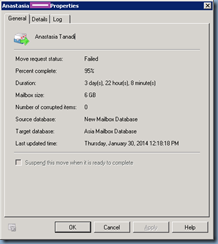
You attempt to move a mailbox from Exchange 2007 to 2010 but noticed that the Move Request fails at 95%:

image

image

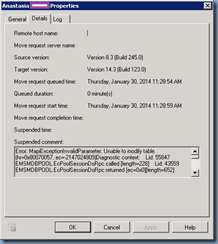
Proceeding to the Details tab reveals the following Suspended comment:
image

Error: MapiExceptionInvalidParameter: Unable to modify table. (hr=0x80070057, ec=-2147024809)

Diagnostic context:

Lid: 55847 EMSMDBPOOL.EcPoolSessionDoRpc called [length=228]

Lid: 43559 EMSMDBPOOL.EcPoolSessionDoRpc returned [ec=0x0][length=652][latency=46]

Lid: 23226 --- ROP Parse Start ---

Lid: 27962 ROP: ropModifyRules [65]

Lid: 17082 ROP Error: 0x80070057

Lid: 27745

Lid: 21921 StoreEc: 0x80070057

Lid: 27962 ROP: ropExtendedError [250]

Lid: 1494 ---- Remote Context Beg ----

Lid: 1238 Remote Context Overflow

Lid: 21970 StoreEc: 0x8004010F PropTag: 0x67870102

Lid: 21970 StoreEc: 0x8004010F PropTag: 0x668F0040

Lid: 21970 StoreEc: 0x8004010F PropTag: 0x67AA000B

Lid: 21970 StoreEc: 0x8004010F PropTag: 0x67870102

Lid: 21970 StoreEc: 0x8004010F PropTag: 0x668F0040

Lid: 21970 StoreEc: 0x8004010F PropTag: 0x67AA000B

Lid: 21970 StoreEc: 0x8004010F PropTag: 0x67870102

Lid: 21970 StoreEc: 0x8004010F PropTag: 0x668F0040

Lid: 21970 StoreEc: 0x8004010F PropTag: 0x67AA000B

Lid: 21970 StoreEc: 0x8004010F PropTag: 0x67870102

Lid: 21970 StoreEc: 0x8004010F PropTag: 0x67F60040

Lid: 48851

Lid: 21970 StoreEc: 0x8004010F PropTag: 0x67F60040

Lid: 65267

Lid: 40691

Lid: 5559 StoreEc: 0x80070057

Lid: 65015

Lid: 65439

Lid: 4302 StoreEc: 0x80070057

Lid: 1750 ---- Remote Context End ----

Lid: 26849

Lid: 21817 ROP Failure: 0x80070057

Lid: 29150

Lid: 20446 StoreEc: 0x80070057

Continuing to the Log tab and clicking the View button displays the following verbose logs:

image

1/30/2014 11:28:54 AM [MailServer01] 'contoso.com/contoso/Bermuda/Users/Terence Luk' created move request.
1/30/2014 11:28:59 AM [MailServer04] The Microsoft Exchange Mailbox Replication service 'MailServer04.contoso.com' (14.3.151.0 caps:07) is examining the request.
1/30/2014 11:28:59 AM [MailServer04] Connected to target mailbox 'Primary (f323d788-25ef-4604-8536-fcec2eb153c3)', database 'Asia Mailbox Database', Mailbox server 'MailServer01.contoso.com' Version 14.3 (Build 123.0).
1/30/2014 11:28:59 AM [MailServer04] Connected to source mailbox 'Primary (f323d788-25ef-4604-8536-fcec2eb153c3)', database 'contosoMS01\Third Storage Group\New Mailbox Database', Mailbox server 'contosoms01.contoso.com' Version 8.3 (Build 245.0).
1/30/2014 11:28:59 AM [MailServer04] Request processing started.
1/30/2014 11:28:59 AM [MailServer04] Mailbox signature will not be preserved for mailbox 'Primary (f323d788-25ef-4604-8536-fcec2eb153c3)'. Outlook clients will need to restart to access the moved mailbox.
1/30/2014 11:29:00 AM [MailServer04] Source mailbox information before the move:
Regular Items: 14861, 6.575 GB (7,059,980,564 bytes)
Regular Deleted Items: 2, 3.867 MB (4,054,770 bytes)
FAI Items: 154, 0 B (0 bytes)
FAI Deleted Items: 0, 8.15 KB (8,346 bytes)
1/30/2014 11:29:01 AM [MailServer04] Initializing folder hierarchy in mailbox 'Primary (f323d788-25ef-4604-8536-fcec2eb153c3)': 145 folders total.
1/30/2014 11:29:02 AM [MailServer04] Folder hierarchy initialized for mailbox 'Primary (f323d788-25ef-4604-8536-fcec2eb153c3)': 145 folders total.
1/30/2014 11:29:02 AM [MailServer04] Stage: CreatingInitialSyncCheckpoint. Percent complete: 15.
1/30/2014 11:29:06 AM [MailServer04] Stage: LoadingMessages. Percent complete: 20.
1/30/2014 11:29:07 AM [MailServer04] Mailbox 'Primary (f323d788-25ef-4604-8536-fcec2eb153c3)' contains 4 soft-deleted items (3.867 MB (4,054,502 bytes)). They won't be migrated.
1/30/2014 11:29:07 AM [MailServer04] Stage: CopyingMessages. Percent complete: 25.
1/30/2014 11:29:07 AM [MailServer04] Copy progress: 0/15011 messages, 0 B (0 bytes)/6.575 GB (7,059,979,292 bytes).
1/30/2014 11:29:08 AM [MailServer04] Messages have been enumerated successfully. 15011 items loaded. Total size: 6.575 GB (7,059,979,292 bytes).
1/30/2014 11:34:08 AM [MailServer04] Stage: CopyingMessages. Percent complete: 32.
1/30/2014 11:34:08 AM [MailServer04] Copy progress: 1819/15011 messages, 757.3 MB (794,036,146 bytes)/6.575 GB (7,059,979,292 bytes).
1/30/2014 11:39:09 AM [MailServer04] Stage: CopyingMessages. Percent complete: 40.
1/30/2014 11:39:09 AM [MailServer04] Copy progress: 2539/15011 messages, 1.488 GB (1,597,760,004 bytes)/6.575 GB (7,059,979,292 bytes).
1/30/2014 11:44:10 AM [MailServer04] Stage: CopyingMessages. Percent complete: 47.
1/30/2014 11:44:10 AM [MailServer04] Copy progress: 3620/15011 messages, 2.107 GB (2,262,009,276 bytes)/6.575 GB (7,059,979,292 bytes).
1/30/2014 11:49:10 AM [MailServer04] Stage: CopyingMessages. Percent complete: 54.
1/30/2014 11:49:10 AM [MailServer04] Copy progress: 4833/15011 messages, 2.801 GB (3,007,770,072 bytes)/6.575 GB (7,059,979,292 bytes).
1/30/2014 11:54:12 AM [MailServer04] Stage: CopyingMessages. Percent complete: 61.
1/30/2014 11:54:12 AM [MailServer04] Copy progress: 7051/15011 messages, 3.433 GB (3,686,175,829 bytes)/6.575 GB (7,059,979,292 bytes).
1/30/2014 11:59:12 AM [MailServer04] Stage: CopyingMessages. Percent complete: 68.
1/30/2014 11:59:12 AM [MailServer04] Copy progress: 9695/15011 messages, 4.117 GB (4,420,836,101 bytes)/6.575 GB (7,059,979,292 bytes).
1/30/2014 12:04:13 PM [MailServer04] Stage: CopyingMessages. Percent complete: 76.
1/30/2014 12:04:13 PM [MailServer04] Copy progress: 11940/15011 messages, 4.805 GB (5,159,692,615 bytes)/6.575 GB (7,059,979,292 bytes).
1/30/2014 12:09:14 PM [MailServer04] Stage: CopyingMessages. Percent complete: 83.
1/30/2014 12:09:14 PM [MailServer04] Copy progress: 12782/15011 messages, 5.51 GB (5,916,507,136 bytes)/6.575 GB (7,059,979,292 bytes).
1/30/2014 12:14:14 PM [MailServer04] Stage: CopyingMessages. Percent complete: 90.
1/30/2014 12:14:14 PM [MailServer04] Copy progress: 13599/15011 messages, 6.141 GB (6,593,692,925 bytes)/6.575 GB (7,059,979,292 bytes).
1/30/2014 12:17:50 PM [MailServer04] Initial seeding completed, 15011 items copied, total size 6.575 GB (7,059,979,292 bytes).
1/30/2014 12:17:50 PM [MailServer04] Changes reported in source 'Primary (f323d788-25ef-4604-8536-fcec2eb153c3)': 0 changed folders, 0 deleted folders, 1 changed messages.
1/30/2014 12:17:50 PM [MailServer04] Incremental Sync 'Primary (f323d788-25ef-4604-8536-fcec2eb153c3)' completed: 1 changed items.
1/30/2014 12:17:50 PM [MailServer04] Stage: IncrementalSync. Percent complete: 95.
1/30/2014 12:17:51 PM [MailServer04] Final sync has started.
1/30/2014 12:18:01 PM [MailServer04] Changes reported in source 'Primary (f323d788-25ef-4604-8536-fcec2eb153c3)': 0 changed folders, 0 deleted folders, 0 changed messages.
1/30/2014 12:18:01 PM [MailServer04] Incremental Sync 'Primary (f323d788-25ef-4604-8536-fcec2eb153c3)' completed: 0 changed items.
1/30/2014 12:18:18 PM [MailServer04] Fatal error MapiExceptionInvalidParameter has occurred.
Error details: MapiExceptionInvalidParameter: Unable to modify table. (hr=0x80070057, ec=-2147024809)
Diagnostic context:
    Lid: 55847   EMSMDBPOOL.EcPoolSessionDoRpc called [length=228]
    Lid: 43559   EMSMDBPOOL.EcPoolSessionDoRpc returned [ec=0x0][length=652][latency=46]
    Lid: 23226   --- ROP Parse Start ---
    Lid: 27962   ROP: ropModifyRules [65]
    Lid: 17082   ROP Error: 0x80070057
    Lid: 27745 
    Lid: 21921   StoreEc: 0x80070057
    Lid: 27962   ROP: ropExtendedError [250]
    Lid: 1494    ---- Remote Context Beg ----
    Lid: 1238    Remote Context Overflow
    Lid: 21970   StoreEc: 0x8004010F PropTag: 0x67870102
    Lid: 21970   StoreEc: 0x8004010F PropTag: 0x668F0040
    Lid: 21970   StoreEc: 0x8004010F PropTag: 0x67AA000B
    Lid: 21970   StoreEc: 0x8004010F PropTag: 0x67870102
    Lid: 21970   StoreEc: 0x8004010F PropTag: 0x668F0040
    Lid: 21970   StoreEc: 0x8004010F PropTag: 0x67AA000B
    Lid: 21970   StoreEc: 0x8004010F PropTag: 0x67870102
    Lid: 21970   StoreEc: 0x8004010F PropTag: 0x668F0040
    Lid: 21970   StoreEc: 0x8004010F PropTag: 0x67AA000B
    Lid: 21970   StoreEc: 0x8004010F PropTag: 0x67870102
    Lid: 21970   StoreEc: 0x8004010F PropTag: 0x67F60040
    Lid: 48851 
    Lid: 21970   StoreEc: 0x8004010F PropTag: 0x67F60040
    Lid: 65267 
    Lid: 40691 
    Lid: 5559    StoreEc: 0x80070057
    Lid: 65015 
    Lid: 65439 
    Lid: 4302    StoreEc: 0x80070057
    Lid: 1750    ---- Remote Context End ----
    Lid: 26849 
    Lid: 21817   ROP Failure: 0x80070057
    Lid: 29150 
    Lid: 20446   StoreEc: 0x80070057
   at Microsoft.Mapi.MapiExceptionHelper.ThrowIfError(String message, Int32 hresult, SafeExInterfaceHandle iUnknown, Exception innerException)
   at Microsoft.Mapi.MapiModifyTable.ModifyTable(ModifyTableFlags flags, ICollection`1 rowList)
   at Microsoft.Mapi.MapiFolder.AddRules(Rule[] rules)
   at Microsoft.Mapi.MapiFolder.SetRules(Rule[] rules)
   at Microsoft.Exchange.MailboxReplicationService.LocalDestinationFolder.Microsoft.Exchange.MailboxReplicationService.IDestinationFolder.SetRules(RuleData[] rules)
   at Microsoft.Exchange.MailboxReplicationService.DestinationFolderWrapper.<>c__DisplayClass31.<Microsoft.Exchange.MailboxReplicationService.IDestinationFolder.SetRules>b__30()
   at Microsoft.Exchange.MailboxReplicationService.ExecutionContext.Execute(GenericCallDelegate operation)
   at Microsoft.Exchange.MailboxReplicationService.DestinationFolderWrapper.Microsoft.Exchange.MailboxReplicationService.IDestinationFolder.SetRules(RuleData[] rules)
   at Microsoft.Exchange.MailboxReplicationService.FolderRecWrapper.WriteRules(IDestinationFolder targetFolder)
   at Microsoft.Exchange.MailboxReplicationService.MailboxCopierBase.CopyFolderProperties(FolderRecWrapper folderRec, ISourceFolder sourceFolder, IDestinationFolder destFolder, FolderRecDataFlags dataToCopy)
   at Microsoft.Exchange.MailboxReplicationService.MailboxMover.<>c__DisplayClass2.<>c__DisplayClass4.<FinalSyncCopyAllFolders>b__1()
   at Microsoft.Exchange.MailboxReplicationService.ExecutionContext.Execute(GenericCallDelegate operation)
   at Microsoft.Exchange.MailboxReplicationService.MailboxMover.<>c__DisplayClass2.<FinalSyncCopyAllFolders>b__0(FolderRecWrapper folderRec, EnumFolderContext ctx)
   at Microsoft.Exchange.MailboxReplicationService.FolderMap.EnumSingleFolder(FolderRecWrapper folderRec, EnumFolderContext ctx, EnumFolderCallback callback, EnumHierarchyFlags flags)
   at Microsoft.Exchange.MailboxReplicationService.FolderMap.EnumSingleFolder(FolderRecWrapper folderRec, EnumFolderContext ctx, EnumFolderCallback callback, EnumHierarchyFlags flags)
   at Microsoft.Exchange.MailboxReplicationService.FolderMap.EnumSingleFolder(FolderRecWrapper folderRec, EnumFolderContext ctx, EnumFolderCallback callback, EnumHierarchyFlags flags)
   at Microsoft.Exchange.MailboxReplicationService.FolderMap.EnumSingleFolder(FolderRecWrapper folderRec, EnumFolderContext ctx, EnumFolderCallback callback, EnumHierarchyFlags flags)
   at Microsoft.Exchange.MailboxReplicationService.MailboxMover.FinalSyncCopyAllFolders()
   at Microsoft.Exchange.MailboxReplicationService.MoveBaseJob.<FinalSync>b__4d(MailboxMover mbxCtx)
   at Microsoft.Exchange.MailboxReplicationService.MoveBaseJob.ForeachMailboxContext(MailboxMoverDelegate del)
   at Microsoft.Exchange.MailboxReplicationService.MoveBaseJob.FinalSync(Object[] wiParams)
   at Microsoft.Exchange.MailboxReplicationService.CommonUtils.CatchKnownExceptions(GenericCallDelegate del, FailureDelegate failureDelegate)
Error context: --------
Operation: IDestinationFolder.SetRules
OperationSide: Target
Primary (f323d788-25ef-4604-8536-fcec2eb153c3)
Rules: [Rule: Condition: none; Actions: [RuleAction: OOFREPLY TemplateEID:[len=70, data=00000000EF3A814DA7AA3D43BA1745450B92452507001615272E4E643E45967C8A0AA6C68D4400CD5354D99600001615272E4E643E45967C8A0AA6C68D4400CF2B0984B40000], TemplateGuid:cef3470e-3e8e-4680-85bc-763348af8165, Flags:0]; Name 'MSFT:TDX OOF Rules'; Provider: 'MSFT:TDX OOF Rules'; ProviderData: ; ExecutionSequence: 50; Level: 0; StateFlags: 141; UserFlags: 2; IsExtended: False]
--------
Folder: '/Top of Information Store/Archive/Inbox', entryId [len=46, data=00000000EF3A814DA7AA3D43BA1745450B9245250100B6F293EEFC8DAA4DB36D6541DB56FFFB000214CBA6BE0000], parentId [len=46, data=00000000EF3A814DA7AA3D43BA1745450B9245250100B6F293EEFC8DAA4DB36D6541DB56FFFB000214CBA6BD0000]
1/30/2014 12:18:18 PM [MailServer04] Relinquishing job.

All of the other mailboxes are moved successfully so you know this error is specific to this user.

Solution

The line that tipped off what the mailbox move was failing on was the following:

Folder: '/Top of Information Store/Archive/Inbox', entryId [len=46,

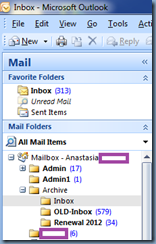
Since the user was on vacation, I went ahead and reset her password so I could log into her mailbox to have a look at the folders and as indicated in the line above, I found an Inbox folder located in an Archive folder:

image

With the hunch that the folder may be corrupted, I renamed the Inbox folder to OLD-Inbox:

image

… created a new Inbox folder:

image

… then moved all the OLD-Inbox folder items into the new Inbox folder:

image

I proceeded to delete the OLD-Inbox folder:
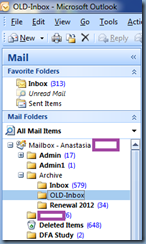
image image

… and then permanently deleted it from the Deleted Items folder:

image

**Note that the step above is important because if you don’t remove the corrupted folder from the Deleted Items the next mailbox move would fail.

Once steps above were done, the mailbox move completed successfully.

Friday, February 7, 2014

Microsoft Exchange 2007 to 2010 mailbox move times / statistics

Throughout all the years I’ve been working with Microsoft Exchange server migrations whether it’s for 2003, 2007, 2010 or the current 2013 version, clients tend to ask me how long I expect their mailboxes to be moved and the answer as most know is “it depends”. 

The first consideration with mailbox moves is that the Exchange 2010 CAS server’s Mailbox Replication Service (MRS) actually throttles / controls the amount of mailboxes are allowed to be moved concurrently.  The default settings can be found on your CAS server in the following config file:

C:\Program Files\Microsoft\Exchange Server\V14\Bin\MSExchangeMailboxReplication.exe.config

image

image

Reference article:

Throttling the Mailbox Replication Service
http://technet.microsoft.com/en-us/library/ff963524.aspx

These values can be changed directly in the config file depending on the environment and whether your existing hardware can sustain and/or deliver the extra resources the move operations require.

The second consideration is the contents of the mailbox where you may have some mailboxes with a lot of small messages and others with few messages but large attachments.  I won’t rewrite what Microsoft already has documented in plenty of their KBs so I’ll simply quote the following:

One 4-GB mailbox with 400 items, each with 10 megabytes (MB) of attachments, will migrate faster than one 4-GB mailbox with 100,000 smaller items.

Factors that affect Exchange Online migration performance
http://technet.microsoft.com/en-us/library/jj204570.aspx

The third consideration is the underlying infrastructure such as the server, network and storage hosting Microsoft Exchange.

With the above in mind, I took the time to document the mailbox move statistics for one of the last migrations I had to do for a client from their Exchange 2007 to 2010 and would like to include it into this blog post so I have something to reference to in the future:

Total Items Size (KB) Size (GB) Move Time (mins) Move Time (hours) Notes
1525134 1525134 1.454481125 30 0.50 Moved in bulk of 4 mailboxes.
15623 3065871 2.92384243 35 0.58 Moved in bulk of 4 mailboxes.
14910 1679458 1.60165596 26 0.43 Moved in bulk of 4 mailboxes.
9034 856083 0.81642437 15 0.25 Moved in bulk of 4 mailboxes.
2212 1465905 1.397995949 30 0.50 Moved in bulk of 4 mailboxes.
232767 13534512 12.90751648 189 3.15 Moved in bulk of 4 mailboxes.
13421 1824829 1.740292549 27 0.45 Moved in bulk of 4 mailboxes.
3067 447994 0.427240372 7 0.12 Moved in bulk of 4 mailboxes.
17229 1805889 1.722229958 18 0.30 Moved in bulk of 4 mailboxes.
10235 1825640 1.741065979 19 0.32 Moved in bulk of 4 mailboxes.
116812 25062475 23.90143871 291 4.85 Moved in bulk of 4 mailboxes.
35377 5773375 5.505919456 80 1.33 Moved in bulk of 4 mailboxes.
400 1824 0.001739502 2 0.03 Moved in bulk of 4 mailboxes.
4154 24953 0.023797035 3 0.05 Moved in bulk of 4 mailboxes.
1623 8153 0.007775307 2 0.03 Moved in bulk of 4 mailboxes.
3676 19919 0.018996239 5 0.08 Moved in bulk of 4 mailboxes.
965 614173 0.585721016 6 0.10 Moved in bulk of 4 mailboxes.
16582 1806149 1.722477913 26 0.43 Moved in bulk of 4 mailboxes.
3192 1755429 1.674107552 14 0.23 Moved in bulk of 4 mailboxes.
954 304840 0.290718079 6 0.10 Moved in bulk of 4 mailboxes.
18408 8242260 7.860431671 49 0.82 Moved in bulk of 4 mailboxes.
14861 6894512 6.575119019   0.00 Moved in bulk of 4 mailboxes.
36312 9623639 9.177817345 69 1.15 Moved in bulk of 4 mailboxes.
867 111425 0.106263161 2 0.03 Moved in bulk of 4 mailboxes.
4099 2220695 2.117819786 15 0.25 Moved in bulk of 4 mailboxes.
745 167195 0.159449577 2 0.03 Moved in bulk of 4 mailboxes.
2980 1988413 1.896298409 14 0.23 Moved in bulk of 4 mailboxes.
6545 2233958 2.130468369 15 0.25 Moved in bulk of 4 mailboxes.
32974 688033 0.656159401 10 0.17 Moved in bulk of 4 mailboxes.
309 52004 0.049594879 1 0.02 Moved in bulk of 4 mailboxes.
355 56905 0.054268837 3 0.05 Moved in bulk of 4 mailboxes.
1778 435017 0.41486454 10 0.17 Moved in bulk of 4 mailboxes.
9130 1112515 1.060976982 14 0.23 Moved in bulk of 4 mailboxes.
7983 2669907 2.546221733 29 0.48 Moved in bulk of 4 mailboxes.
5310 1978011 1.886378288 34 0.57 Moved in bulk of 4 mailboxes.
7632 3295918 3.143232346 38 0.63 Moved in bulk of 4 mailboxes.
4061 1017960 0.970802307 43 0.72 Moved in bulk of 4 mailboxes.
438 79156 0.075489044 56 0.93 Moved in bulk of 4 mailboxes.
5006 909068 0.866954803 54 0.90 Moved in bulk of 4 mailboxes.
2413 597744 0.570053101 63 1.05 Moved in bulk of 4 mailboxes.
587 153565 0.146450996 65 1.08 Moved in bulk of 4 mailboxes.
14894 6910834 6.590684891 32 0.53 Bulk move on Friday evening so time is not accurate due to queued time.
7 96 9.15527E-05 148 2.47 Moved in bulk of 24 mailboxes time is not accurate due to queued time.
16 98 9.34601E-05 149 2.48 Moved in bulk of 24 mailboxes time is not accurate due to queued time.
56014 1910238 1.821744919 160 2.67 Moved in bulk of 24 mailboxes time is not accurate due to queued time.
11483 6078693 5.797093391 87 1.45 Moved in bulk of 24 mailboxes time is not accurate due to queued time.
44898 1983107 1.891238213 191 3.18 Moved in bulk of 24 mailboxes time is not accurate due to queued time.
3632 3525576 3.362251282 91 1.52 Moved in bulk of 24 mailboxes time is not accurate due to queued time.
1251 204801 0.195313454 94 1.57 Moved in bulk of 24 mailboxes time is not accurate due to queued time.
461 39790 0.037946701 95 1.58 Moved in bulk of 24 mailboxes time is not accurate due to queued time.
5 83 7.9155E-05 146 2.43 Moved in bulk of 24 mailboxes time is not accurate due to queued time.
678 196778 0.187662125 96 1.60 Moved in bulk of 24 mailboxes time is not accurate due to queued time.
9419 6484428 6.18403244 141 2.35 Moved in bulk of 24 mailboxes time is not accurate due to queued time.
2825 2406936 2.295433044 112 1.87 Moved in bulk of 24 mailboxes time is not accurate due to queued time.
131 1358 0.00129509 150 2.50 Moved in bulk of 24 mailboxes time is not accurate due to queued time.
1221 21467 0.020472527 152 2.53 Moved in bulk of 24 mailboxes time is not accurate due to queued time.
299 22777 0.02172184 153 2.55 Moved in bulk of 24 mailboxes time is not accurate due to queued time.
6 108 0.000102997 154 2.57 Moved in bulk of 24 mailboxes time is not accurate due to queued time.
5 83 7.9155E-05 155 2.58 Moved in bulk of 24 mailboxes time is not accurate due to queued time.
4 82 7.82013E-05 155 2.58 Moved in bulk of 24 mailboxes time is not accurate due to queued time.
6 207 0.000197411 156 2.60 Moved in bulk of 24 mailboxes time is not accurate due to queued time.
669 284160 0.270996094 117 1.95 Moved in bulk of 24 mailboxes time is not accurate due to queued time.
1630 398170 0.379724503 123 2.05 Moved in bulk of 24 mailboxes time is not accurate due to queued time.
5522 2040967 1.946417809 139 2.32 Moved in bulk of 24 mailboxes time is not accurate due to queued time.
11299 5977986 5.701051712 185 3.08 Moved in bulk of 24 mailboxes time is not accurate due to queued time.
4216 1505535 1.435790062 156 2.60 Moved in bulk of 24 mailboxes time is not accurate due to queued time.
24646 9520968 9.079902649 79 1.32 Bulk move on Friday evening so time is not accurate due to queued time.
44206 17079551 16.28832912 152 2.53 Bulk move on Friday evening so time is not accurate due to queued time.
39012 14647426 13.96887398 223 3.72 Bulk move on Friday evening so time is not accurate due to queued time.
84 1002 0.000955582 2 0.03 Bulk move on Friday evening so time is not accurate due to queued time.
45601 17593577 16.77854252 143 2.38 Bulk move on Friday evening so time is not accurate due to queued time.
111 4167 0.003973961 0 0.00 Bulk move on Friday evening so time is not accurate due to queued time.
13 137 0.000130653 1 0.02 Bulk move on Friday evening so time is not accurate due to queued time.
32 198 0.000188828 2 0.03 Bulk move on Friday evening so time is not accurate due to queued time.
17 149 0.000142097 3 0.05 Bulk move on Friday evening so time is not accurate due to queued time.
36 193 0.000184059 5 0.08 Bulk move on Friday evening so time is not accurate due to queued time.
891 4410 0.004205704 7 0.12 Bulk move on Friday evening so time is not accurate due to queued time.
3 78 7.43866E-05 8 0.13 Bulk move on Friday evening so time is not accurate due to queued time.
3 82 7.82013E-05 6 0.10 Bulk move on Friday evening so time is not accurate due to queued time.
245 1897 0.00180912 10 0.17 Bulk move on Friday evening so time is not accurate due to queued time.
67756 11653915 11.11403942 300 5.00 Bulk move on Friday evening so time is not accurate due to queued time.
223609 54760184 52.22338104 878 14.63 Bulk move on Friday evening so time is not accurate due to queued time.
72039 8862773 8.452198982 173 2.88 Bulk move on Friday evening so time is not accurate due to queued time.
92932 7511814 7.163824081 481 8.02 Bulk move on Friday evening so time is not accurate due to queued time.
33039 4848139 4.623545647 579 9.65 Bulk move on Friday evening so time is not accurate due to queued time.
26812 10979244 10.47062302 376 6.27 Bulk move on Friday evening so time is not accurate due to queued time.
49054 7671419 7.316035271 260 4.33 Bulk move on Friday evening so time is not accurate due to queued time.
64281 9188019 8.762377739 203 3.38 Bulk move on Friday evening so time is not accurate due to queued time.
54019 25236395 24.06730175 525 8.75 Bulk move on Friday evening so time is not accurate due to queued time.
46409 17573022 16.75893974 689 11.48 Bulk move on Friday evening so time is not accurate due to queued time.
28285 10126503 9.657385826 104 1.73 Bulk move on Friday evening so time is not accurate due to queued time.
3895 378507 0.360972404 305 5.08 Bulk move on Friday evening so time is not accurate due to queued time.
17953 5143101 4.90484333 517 8.62 Bulk move on Friday evening so time is not accurate due to queued time.
445 41864 0.039924622 378 6.30 Bulk move on Friday evening so time is not accurate due to queued time.
9849 1623132 1.547939301 279 4.65 Bulk move on Friday evening so time is not accurate due to queued time.
15326 2885985 2.752289772 748 12.47 Bulk move on Friday evening so time is not accurate due to queued time.
6421 617166 0.588575363 697 11.62 Bulk move on Friday evening so time is not accurate due to queued time.
14367 2307430 2.200536728 720 12.00 Bulk move on Friday evening so time is not accurate due to queued time.
7073 2470272 2.355834961 764 12.73 Bulk move on Friday evening so time is not accurate due to queued time.
16369 2975223 2.837393761 60 1.00 Bulk move on Friday evening so time is not accurate due to queued time.
2333 170347 0.162455559 700 11.67 Bulk move on Friday evening so time is not accurate due to queued time.
3453 1868715 1.7821455 121 2.02 Bulk move on Friday evening so time is not accurate due to queued time.
1659 165551 0.157881737 64 1.07 Bulk move on Friday evening so time is not accurate due to queued time.
2932 1335859 1.273974419 728 12.13 Bulk move on Friday evening so time is not accurate due to queued time.
152 1078 0.001028061 1 0.02 Bulk move on Friday evening so time is not accurate due to queued time.
1885 141653 0.135090828 7 0.12 Bulk move on Friday evening so time is not accurate due to queued time.
6 83 7.9155E-05 5 0.08 Bulk move on Friday evening so time is not accurate due to queued time.
72 3243 0.003092766 6 0.10 Bulk move on Friday evening so time is not accurate due to queued time.
17008 3302957 3.149945259 544 9.07 Bulk move on Friday evening so time is not accurate due to queued time.

Friday, March 22, 2013

Enabling users to reply to old emails from imported PSTs originating from a different Exchange organization

I’ve recently been working with an organization going through a transition to new ownership and one of the changes taking place is that the company will inherit users from a remote office that is currently owned by the company that is selling them off.  I always struggle to phrase the scenario properly so let me use the following itemized points to describe the environment:

  • Company A’s Active Directory is comprised of 1 domain in 1 forest named newDomain.internal
  • Company B’s Active Directory is comprised of 1 domain in 1 forest named oldDomain.internal
  • Company B has 20 users who will be moving to Company A’s domain
  • An administrator from Company B will export the 20 users Exchange mailbox to PST and deliver it to Company A
  • Company A will create new AD and Exchange mailboxes for these 20 users and import the PSTs

I am working for Company A and my task is to ensure that when these 20 users can open up their Outlook and click the Reply button to an old email containing one or more of the 19 users moved over to Company A.  As most administrators may know Exchange uses X.500 addresses for e-mail sent to addresses within the Exchange organization so when users open up the old emails with the migrated users’ email addresses, these addresses are not stored in SMTP format but rather X.500 format that looks something similar to the following:

/o=newDomain/ou=Exchange Administrative Group (FYDIBOHF23SPDLT)/cn=Recipients/cn=Luk, Terence

Attempting to reply to these old emails will show the following in Outlook:

This e-mail message cannot be delivered to UserName X because the e-mail address is no longer valid.

image

If you proceed to reply to these emails within the new domain, you will receive a bounce back because you’re asking Exchange to route an email with a X.500 address that is foreign to the new newDomain.internal organization.  In order to address the issue for replying to these emails when the migrated oldDomain.internal users attempt to reply to an old email that was imported from the PST export of their oldDomain.internal mailbox, we can configure an x500 proxy address for the users.  The X.500 proxy address we’ll need can be retrieved from the user’s legacyExchangeDN value in the oldDomain.internal domain and can be retrieved with the following 3 methods:

ADSIedit Console

You can retrieve the user’s legacyExchangeDN attribute by using the adsiedit.msc console and viewing the user object’s properties as shown in the following screenshot:

image

image

Exchange PowerShell Cmdlet

If the mailbox is in an Exchange 2007 or 2010 organization, you can use the following cmdlet to retrieve the value of the attribute:

Get-Mailbox "Mailbox Name" | Format-List LegacyExchangeDN

image

Outlook Contact Properties

If you do not have access to the old domain or the administrator there would not give you the legacyExchangeDN attribute value then you can wait till you get the exported PSTs, import them, and use Outlook to retrieve the attribute value:

Open the user’s Outlook Properties from within Outlook:

image

clip_image001

--------------------------------------------------------------------------------------------------------------------------------------------------------------------

With the attribute retrieved, we can then proceed to use the Exchange Management Console to add a X.500 address to the users’ properties:

image

image

From within the E-Mail Addresses tab, click on the Add button then Custom Address…:

image

clip_image001[4]

From within the Custom Address window, enter the legacyExchangeDN attribute into the E-mail address field and X500 into the E-mail type field:

clip_image001[6]

A new address should now be displayed:

image 

Note that Outlook will need to be restarted if it was opened before the X.500 address was entered:

image

Once Outlook is restarted, you should now be able to reply to the old email:

image