Pages

Tuesday, August 3, 2010

Changes in CS 14 compared with forwarding calls from OCS 2007 R2 to PSTN #

Day 1 – Module 03

I’ve always been unhappy when I forward calls from my main office line to my cell phone number when I’m on the road because the call display # is always displayed as my office #. Logically thinking about what happens behind the scenes:

1. Call goes into our office.

2. OCS makes a call back out to me.

…it makes sense but it doesn’t help a whole lot when you’re in meetings and you’re trying to differentiate whether it’s an important call or not. In CS 14, the call is now rewritten to display the real number that’s calling. Great addition!

CS 14’s Mediation Server and Gateway Relationship Changes – Routing to multiple gateways

Day 1 – Module 03

I ran into an issue with a client awhile ago when trying to configure a SIP trunk and realized that the mediation server had a 1 to 1 relationship with gateways and therefore in their environment, 3 mediations were required to be deployed. The problem with this was that if you lost the mediation server, you pretty much lose the gateway (unless you point another mediation server to the same gateway). In CS 14, this 1:1 relationship has been removed and you are now able to define routes so traffic is sent from the mediation server to multiple gateways thus giving you the 1:N relationship. What the limit is for N was not mentioned.

CS 14 and calls made to non-existent extension

Day 1 – Module 02

As many OCS 2007 R2 administrators may know, if a user makes a call to a non-existent extension, the route of the call will fail and the user would be presented with something along the lines of “cannot complete the call”. In CS 14, we will now have the ability to reroute these calls to another extension with an announcement. I have yet to have any clients complain about this in OCS 2007 R2 but this feature is most certainly welcomed!

Communications Server Wave 14 & Virtualized Desktops Support

Day 1 – Module 2

While virtualization for server roles are going to be supported but have yet to be finalized, client virtualization technologies such as Citrix is supported for IM and meetings but audio and video is NOT supported . Microsoft’s recommendations is to use an IP phone if virtualized desktops are used.

Communications Server “14” and the “Microsoft Office Communications Server 2007 Global Settings dilemma”

Day 1 – Module 02

During all of my deployments since OCS 2007 R2 was out, I’ve always recommended to clients with OCS 2007 R1 to move their global settings as per the following document found here: http://www.microsoft.com/downloads/details.aspx?FamilyID=23236784-508e-44c9-809d-30ff245928d8&displaylang=en. I won’t dwell into the benefits for this as the document clearly explains why but back when I was making these recommendations, my justification was that if you don’t move it now, if Microsoft’s future OCS versions are affected drastically, more effort will be required to move them (through import and export of settings). I actually ran into a nightmare-ish issue during one of my deployments which I will blog sometime in the future on how to resolve a failed global settings move.

So I’m at Communications Server wave “14” training in Arizona and the MCS consultant says the reliant on these settings have been de-emphasized due to the settings being stored in CMS. Unfortunate but at least I won’t have to worry about migrating these settings in the future if I ever have to do a R1 to R2 migration.

Monday, August 2, 2010

Event ID: 17 Error | Time Provider NtpClient: An error occurred during DNS lookup of the manually configured peer…

The fix for the Event ID: 17 error is pretty obvious but I promised my client that I’ll blog it so here it is:

Problem:

Event ID 12 is being logged in the System event logs on the domain controller (not all of them, just 1 of them):

image

The error complains about:

----------------------------------------------------------------------------

Time Provider NtpClient: An error occurred during DNS lookup of the manually configured peer 'dc666;dc999'. NtpClient will try the DNS lookup again in 480 minutes. The error was: No such service is known. The service cannot be found in the specified name space. (0x8007277C)

For more information, see Help and Support Center at http://go.microsoft.com/fwlink/events.asp.

----------------------------------------------------------------------------

Resolution:

The reason why this is being logged is because there are invalid entries in the registry of this domain controller that is pointing it to invalid servers for NTP. To correct the problem, simply open up the registry with regedit and navigate to:

HKEY_LOCAL_MACHINE\SYSTEM\CurrentControlSet\Services\W32Time\Parameters\NtpServer

image

Note that I’ve already removed the invalid entries in the above screenshot.

…then remove the invalid entries.

One this has been completed, the logs should be error free.

Sunday, August 1, 2010

Renewing a subordinate certificate without generating a new public and private key

I ran into a seemingly trivial task which ended up being nerve racking and extreme uncertainty.

Situation

We have a client associated with the military who has a lot of wireless devices that use certificate services to authenticate. The client had a bad experience with renewing certificates in the past when the public and private key were inadvertently changed during the renewal process which was why we were brought in for the maintenance work. I basically remember that all I had to do was:

1. Stop the CA service.

2. Right click on the CA.

3. Select Renew CA Certificate.

image

4. Select No so it doesn’t generate a new public and private key, then click OK.
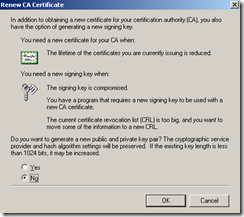
image

I also went ahead to validate these steps by:

1. Open Help and Support Center.

2. Type in Renew Subordinate and then search.

image

3.Select Renew a subordinate certification authority : Certificate Services.

image

4. Then review the instructions.

image

Being an Active Directory consultant and working with CA services on many projects in the past, I figure this would be a piece of cake but what I didn’t realize is that I don’t actually live and breath in this on a day-by-day basis so when the client looked at me in the eyes and asked me if I was sure when I was about to renew the subordinate’s Root CA issued certificate, I couldn’t say whether I was 100% or not. I felt that I was 99% sure but seeing how you do this every 2 to 3 years (when certificates expires), I couldn’t give him a definitive answer. This was when we reached out to Microsoft.

Solution

Long story short, we had the Microsoft Engineer review the environment and showed him that we can’t do it the following way as we usually do with the other certificates:
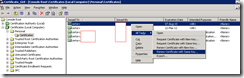
image

image

The engineer went through the configuration, asked us to change these 2 policies, which I don’t think it did anything:

image

Note: He wanted us to change the Not Defined to Enabled.

After 2 hours of troubleshooting, he went back to the original steps I had listed above and proceeded with:

image

image

Then completed the update. The certificate looked like this before:

image

…and it looks like this now:

image

What we ended up doing was compare the Public Key value of the old one and new one to see if it matched.

image image

Seeing how both keys matched, the public and private key should be the same. I hope this helps anyone out there caught in my situation because as I mentioned earlier, if you don’t do this every day, what you did last year or 2 years ago isn’t so sure anymore.