Pages

Tuesday, December 7, 2010

Failure testing OCS 2007 R2 Edge server with https://www.testocsconnectivity.com/ with the message: “Connectivity Test Failed” and “Testing SSLCertificate for validity.”

Ran into an interesting failure while testing a newly deployed OCS 2007 R2 Edge server on a Windows Server 2008 R2 64-bit server that I thought was worth a blog post because what ended up fixing it seemingly had nothing to do with the error message. First off, I actually made the mistakes of selected 5061 as the port instead of 443 which was what I intended to do. The reason why I made this mistakes was:

  1. I did not select the auto discovery option because the ISP managed to incorrectly create the public SRV records 3 times.
  2. I didn’t pay attention while manually entering the settings.

Though I had selected the wrong port, I did learn something out of this and it was one of the many reasons that could possibly cause https://www.testocsconnectivity.com/ to throw the error message:

“Testing SSLCertificate for validity.”

Problem

You use https://www.testocsconnectivity.com/ to test your newly deployed OCS 2007 R2 Edge server but run into the following results:

clip_image001

Connectivity Test Failed

Test Details

Copy to Clipboard

Expand/Collapse

clip_image002

Testing the Remote Connectivity of user tluk@domain.com.

Specified Remote Connectivity test(s) failed. Please examine below details of specific reason for failure.

clip_image003

Test Steps

clip_image004

Attempting to Resolve the host name sip.domain.com in DNS.

Host successfully Resolved

clip_image005

Additional Details

IP(s) returned: 99.333.181.44

clip_image004[1]

Testing TCP Port 5061 on host sip.domain.com to ensure it is listening/open.

The port was opened successfully.

clip_image002[1]

Testing SSLCertificate for validity.

The SSLCertificate failed one or more certificate

clip_image006

Tell me more about this issue and how to resolve it

clip_image003[1]

Additional Details

A network connection error occured while communicating with the remote host: Exception Details: Message: Unable to read data from the transport connection: An existing connection was forcibly closed by the remote host. Type: System.IO.IOException Stack Trace: at System.Net.Sockets.NetworkStream.Read(Byte[] buffer, Int32 offset, Int32 size) at System.Net.FixedSizeReader.ReadPacket(Byte[] buffer, Int32 offset, Int32 count) at System.Net.Security.SslState.StartReadFrame(Byte[] buffer, Int32 readBytes, AsyncProtocolRequest asyncRequest) at System.Net.Security.SslState.StartReceiveBlob(Byte[] buffer, AsyncProtocolRequest asyncRequest) at System.Net.Security.SslState.CheckCompletionBeforeNextReceive(ProtocolToken message, AsyncProtocolRequest asyncRequest) at System.Net.Security.SslState.StartSendBlob(Byte[] incoming, Int32 count, AsyncProtocolRequest asyncRequest) at System.Net.Security.SslState.ProcessReceivedBlob(Byte[] buffer, Int32 count, AsyncProtocolRequest asyncRequest) at System.Net.Security.SslState.StartReadFrame(Byte[] buffer, Int32 readBytes, AsyncProtocolRequest asyncRequest) at System.Net.Security.SslState.StartReceiveBlob(Byte[] buffer, AsyncProtocolRequest asyncRequest) at System.Net.Security.SslState.CheckCompletionBeforeNextReceive(ProtocolToken message, AsyncProtocolRequest asyncRequest) at System.Net.Security.SslState.StartSendBlob(Byte[] incoming, Int32 count, AsyncProtocolRequest asyncRequest) at System.Net.Security.SslState.ForceAuthentication(Boolean receiveFirst, Byte[] buffer, AsyncProtocolRequest asyncRequest) at System.Net.Security.SslState.ProcessAuthentication(LazyAsyncResult lazyResult) at System.Net.Security.SslStream.AuthenticateAsClient(String targetHost, X509CertificateCollection clientCertificates, SslProtocols enabledSslProtocols, Boolean checkCertificateRevocation) at System.Net.Security.SslStream.AuthenticateAsClient(String targetHost) at TestOCSConnectivity.Tests.SSLCertificateTest.PerformTestReally() Exception Details: Message: Unable to read data from the transport connection: An existing connection was forcibly closed by the remote host. Type: System.IO.IOException Stack Trace: at System.Net.Sockets.NetworkStream.Read(Byte[] buffer, Int32 offset, Int32 size) at System.Net.FixedSizeReader.ReadPacket(Byte[] buffer, Int32 offset, Int32 count) at System.Net.Security.SslState.StartReadFrame(Byte[] buffer, Int32 readBytes, AsyncProtocolRequest asyncRequest) at System.Net.Security.SslState.StartReceiveBlob(Byte[] buffer, AsyncProtocolRequest asyncRequest) at System.Net.Security.SslState.CheckCompletionBeforeNextReceive(ProtocolToken message, AsyncProtocolRequest asyncRequest) at System.Net.Security.SslState.StartSendBlob(Byte[] incoming, Int32 count, AsyncProtocolRequest asyncRequest) at System.Net.Security.SslState.ProcessReceivedBlob(Byte[] buffer, Int32 count, AsyncProtocolRequest asyncRequest) at System.Net.Security.SslState.StartReadFrame(Byte[] buffer, Int32 readBytes, AsyncProtocolRequest asyncRequest) at System.Net.Security.SslState.StartReceiveBlob(Byte[] buffer, AsyncProtocolRequest asyncRequest) at System.Net.Security.SslState.CheckCompletionBeforeNextReceive(ProtocolToken message, AsyncProtocolRequest asyncRequest) at System.Net.Security.SslState.StartSendBlob(Byte[] incoming, Int32 count, AsyncProtocolRequest asyncRequest) at System.Net.Security.SslState.ForceAuthentication(Boolean receiveFirst, Byte[] buffer, AsyncProtocolRequest asyncRequest) at System.Net.Security.SslState.ProcessAuthentication(LazyAsyncResult lazyResult) at System.Net.Security.SslStream.AuthenticateAsClient(String targetHost, X509CertificateCollection clientCertificates, SslProtocols enabledSslProtocols, Boolean checkCertificateRevocation) at System.Net.Security.SslStream.AuthenticateAsClient(String targetHost) at TestOCSConnectivity.Tests.SSLCertificateTest.PerformTestReally()

image

As I noted above, this can be caused by other reasons and the following is only one of the reasons.

Solution

What I found was that the edge servers weren’t defined in the Edge Servers tab in the Office Communications Server Global properties.

image

Once I filled in the servers, this error from https://www.testocsconnectivity.com/ (Microsoft Office Communications Server Remote Connectivity Analyzer) went away.

image

I found this extremely strange because the error referenced the SSL certificate yet this didn’t seem like something that would cause such an error.

image

Microsoft Office Communications Server Remote Connectivity Test fails with: “Subscription for provisioning data did not return a valid MRAS URI.”

Lately, I’ve been receiving feedback about my posts that the solution to the issues are not always correct. It’s partly my fault for not including an additional note that the problems I write about along with their solutions are only one of the many scenarios that may exists and if they don’t necessarily work for all situations. I would like to thank the people who have provided me with this feedback and I’ll make sure I make this note in my future posts.

As with many errors or warnings that you may experience with Microsoft Office Communications Server 2007 R2, note that following solution is one of the many that may cause such an error so it may or may not apply to other situations were this error is thrown.

Problem

You’ve deployed a new OCS 2007 R2 Edge server and have begun testing with Microsoft Office Communications Server Remote Connectivity Test tool at https://www.testocsconnectivity.com. Since the public DNS SRV records have not been created yet, you have opted to use the tool without the AutoDiscover option but once you’ve completed entering all the information, you get the following result:

clip_image001

Connectivity Test Failed

Test Details

Copy to Clipboard

Expand/Collapse

clip_image002

Testing the Remote Connectivity to Microsoft Office Communications Server Access Edge Server sip.domain.com running on port number 5061 to see if user tluk@domain.com can connect remotely.

Specified Remote Connectivity test(s) failed. Please examine below details of specific reason for failure.

clip_image003

Test Steps

clip_image004

Attempting to Resolve the host name sip.domain.com in DNS.

Host successfully Resolved

clip_image005

Additional Details

IP(s) returned: 99.299.181.49

clip_image004[1]

Testing TCP Port 5061 on host sip.domain.com to ensure it is listening/open.

The port was opened successfully.

clip_image004[2]

Testing SSLCertificate for validity.

The certificate passed all validation requirements.validation checks.

clip_image005[1]

Additional Details

Subject: CN=sip.domain.com, OU=Domain Control Validated, O=sip.domain.com, Issuer SERIALNUMBER=9999, CN=Go Daddy Secure Certification Authority, OU=http://certificates.godaddy.com/repository, O="GoDaddy.com, Inc.", L=Scottsdale, S=Arizona, C=US

clip_image002[1]

Testing Microsoft Office Communications Server remote sign in through Access Edge Server: Port Number (sip.domain.com:5061), for SignInAddress (tluk@domain.com).

Specified Remote Connectivity test(s) failed. Please examine below details of specific reason for failure.

clip_image006

Tell me more about this issue and how to resolve it

clip_image003[1]

Additional Details

Subscription for provisioning data did not return a valid MRAS URI.

image

Analyzing the Problem

The first place I checked because the server I was working with Windows Server 2008 R2 was the local security settings:

image

Since this was set properly, I proceeded to move on to doing SIPStack traces on the Edge server to see if I was able to capture additional information to help with the troubleshooting:

image

While the SIPStack trace only provided 2 entries, it turned out to be more than enough to indicate what was causing the error:

image

TL_INFO(TF_CONNECTION) [0]0688.0960::12/02/2010-23:17:57.673.0000000d (SIPStack,SIPAdminLog::TraceConnectionRecord:SIPAdminLog.cpp(161))$$begin_record

LogType: connection

Severity: information

Text: TLS negotiation started

Local-IP: 192.168.80.133:5061

Peer-IP: 66.247.89.72:13949

Connection-ID: 0x4100

Transport: TLS

Note: Sorry but I lost the screenshot for the snooper trace and only have the text

TL_ERROR(TF_CONNECTION) [0]0688.041C::12/02/2010-23:17:57.705.00000010 (SIPStack,SIPAdminLog::TraceConnectionRecord:SIPAdminLog.cpp(157))$$begin_record

LogType: connection

Severity: error

Text: The connection from a remote user client is refused because remote user access is not enabled on this port

Peer-IP: 66.257.89.51:13949

Transport: TLS

Result-Code: 0xc3e93d86 SIPPROXY_E_CONNECTION_REMOTE_CLIENT_NOT_THIS_PORT

Data: listening-port="5061"

$$end_record

-------------------------------------------------------------------------------------------------------------------------------------------------------

Solution

What immediately (and finally) caught my eye was that port 5061 was being used and our public SRV record is supposed to direct traffic to port 443 when users are connecting to the Edge with their MOC clients.

All that was required to be changed to receive an error free test was the OCS Access Edge Server Port which in this case should be 443 and not 5061.

image

Friday, December 3, 2010

“1 is not valid” response from Exchange 2010 Auto Attendant when key mappings are present

I had written a post about speech enabled and not enabled Exchange 2010 Auto Attendant prompts (http://terenceluk.blogspot.com/2010/11/how-speech-enabled-and-non-speech.html) but forgot to mention a critical “by design” behavior about key mappings and because I ran into this problem today, I thought it would be a good idea to write a short post about it.

Problem

You’ve created a newly auto attendant prompt that is not speech enabled with the following properties:

Speech IS NOT enabled.

image

Business hours key mappings are set.

image

A custom 10 second business hours greeting saying: “Thank you for calling us, press 1 for accounts payable, 2 for accounts receivable, 3….” is played.

image

You call into the auto attendant and hear the business hours greeting getting played and before it finishes, you hit option 1 for accounts payable because that’s what you want but you get the following reply from the auto attendant:

“1 is not valid”

You try doing the same for option 2 interrupting the prompt but you get the reply:

“2 is not valid”

Solution

The reason why you’re getting this reply from the auto attendant is because of the following:

Your prompt is not speech enabled and therefore you cannot interrupt the Business Hours Greeting.

The way around this is to actually put a blank wav or wma file for the Business Hours Greeting and use the custom recorded greeting for the Business Hours main menu prompt.

image

By doing so, the caller will be able to interrupt the auto attendant and not have to wait for it to finish in order to use the key mappings.

Fast busy with OCS 2007 R2 Dial-in Conferencing after renewing certificates

This post is yet another component in OCS 2007 R2 that can be broken if you don’t restart your services after renewing the certificates. Seeing how I’ve already written other posts that are similar, you might ask: why make another post like this? My reasoning is that this may help someone out there who’s not familiar OCS 2007 R2 when he or she searches for the error messages found in the validation logs.

The following are screenshots and error messages that you’ll see in the validation logs:

clip_image001clip_image002clip_image003Validate that one can connect to the application.

Failure
[0xC3FC200D] One or more errors were detected

clip_image001[1]clip_image001[2]clip_image002[1]clip_image003[1]Application Host ulocs02.domain.com

DNS Resolution succeeded: 172.33.1.33
The remote server presented an expired certificate.: 172.33.1.33:5073 Error Code: 0x80090328 Outgoing TLS negotiation failed. Remote certificate expired; HRESULT=-2146893016
Suggested Resolution: The remote server certificate needs to be renewed or replaced with a valid certificate.

Failure
[0xC3FC200D] One or more errors were detected

clip_image001[3]clip_image001[4]clip_image002[2]clip_image003[2]Application Host ocspool2.domain.com

DNS Resolution succeeded: 172.33.1.33
The remote server presented an expired certificate.: 172.33.1.33:5073 Error Code: 0x80090328 Outgoing TLS negotiation failed. Remote certificate expired; HRESULT=-2146893016
Suggested Resolution: The remote server certificate needs to be renewed or replaced with a valid certificate.

Failure
[0xC3FC200D] One or more errors were detected

image

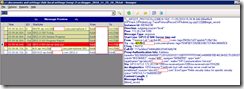
Snooper traces on the front end server show the following:

TL_INFO(TF_PROTOCOL) [2]0B24.102C::11/25/2010-15:39:36.648.006e88c8 (SIPStack,SIPAdminLog::TraceProtocolRecord:SIPAdminLog.cpp(122))$$begin_record

Instance-Id: 00D5AD98

Direction: outgoing;source="local"

Peer: 172.20.2.64:1099

Message-Type: response

Start-Line: SIP/2.0 504 Server time-out

From: "Terence Luk"<sip:tluk@domain.com>;tag=35830c1d37;epid=b7128e13bc

To: <sip:+6125@domain.com;user=phone>;tag=7934F6EF33928ED06C1CF46A346665C6

CSeq: 1 INVITE

Call-ID: 117acb6ea73d44fa86fc01bf63e6b74f

Proxy-Authentication-Info: Kerberos rspauth="602306092A864886F71201020201011100FFFFFFFFFD84CA40889D55E46C9A92C7D2083CF1", srand="8DD9ABB2", snum="485", opaque="66566559", qop="auth", targetname="sip/ulocs02.domain.com", realm="SIP Communications Service"

Via: SIP/2.0/TLS 172.20.2.64:1099;ms-received-port=1099;ms-received-cid=1516200

ms-diagnostics: 1010;reason="Certificate trust with next-hop server could not be established";source="ulocs02.domain.com";ErrorType="Refer security status for specific security status";HRESULT="0x80090328"

Content-Length: 0

Message-Body: –

$$end_record
image

TL_INFO(TF_PROTOCOL) [7]0B24.1030::11/25/2010-15:26:18.585.006a5f2e (SIPStack,SIPAdminLog::TraceProtocolRecord:SIPAdminLog.cpp(122))$$begin_record

Instance-Id: 00D59A0C

Direction: outgoing;source="local"

Peer: ulmedi02.domain.com:3801

Message-Type: response

Start-Line: SIP/2.0 504 Server time-out

From: "UNIS LUMIN"<sip:+19058476800@domain.com;user=phone>;epid=2EB99BB36E;tag=d735b91b9

To: <sip:+6123@domain.com;user=phone>;tag=7934F6EF33928ED06C1CF46A346665C6

CSeq: 13076 INVITE

Call-ID: 329c3891-859d-4c5f-8125-3741e3413855

ms-application-via: backend_token;ms-server=ulocs02.domain.com;ms-pool=ocspool2.domain.com;ms-application=51FB453D-5B9F-45df-83B4-ADD1F7E604A8

Via: SIP/2.0/TLS 172.20.1.122:3801;branch=z9hG4bK47a7d4cc;ms-received-port=3801;ms-received-cid=15F4A00

ms-diagnostics: 1010;reason="Certificate trust with next-hop server could not be established";source="ulocs02.domain.com";ErrorType="Refer security status for specific security status";HRESULT="0x80090328"

Content-Length: 0

Message-Body: –

$$end_record

image

Tanjay sign-in issue after renewing OCS 2007 R2 certificates

It was that time of the year again when our OCS certificates were to expire and to add to that, our root certificates was expiring as well. My colleague and I went on to renew our root certificate (see this post for more information about renewing the root certificate: http://terenceluk.blogspot.com/2010/08/renewing-subordinate-certificate.html).

What was interesting about this year’s certificate renewal routine was that we noticed that after going through the procedures we had documented, all of our Tanjays were signed out as such:

01122010224

If we were to initiate a sign in, we would see the following loop:

  1. Signing in…
  2. Downloading certificate…
  3. Installing certificate…

… back to the sign in screen.

01122010230

01122010228

01122010227

01122010224

I verified with my colleague that we republished the root CA’s new certificate as shown in the following blog post: http://blogs.technet.com/b/jenstr/archive/2007/11/17/how-to-make-the-root-ca-certificate-available-for-office-communicator-2007-phone-edition.aspx. I also asked if we’ve tried hard resetting the phones to see if that will force the Tanjay to download the new certificate properly and while I was told that we’ve tried it already, I went ahead to do it again.

Once I did a hard reset of my phone, it started to work. My suspicion is that the hard reset my colleague tried was done before we had republished the root certificate. Not that this is a great solution if you had 5000 phones but since I did not have time to further investigate, we just had everyone do a hard reset of their phone to fix the problem.