As I mentioned in my previous 2 posts, the installation and configuration wasn’t really special as they were simply screenshots of pretty much the flow of a next… next… next… install. To add some value to the experience of this install, here’s the post of the problem I experienced. A few notes before I continue:
- I was stumped on the day of the install and configure so I figure I’d be lazy and post this error on our Microsoft partner forum which I would get an answer the next day. I do this a lot for certain deployments when finalizing the install is not immediately required because although I get a response the next day and may need to go back and forth with support, it frees up my time to work on other projects related to design (the Microsoft Partner Forums only support break/fix incidents).
- Unfortunately for me, I got a response from the partner forums that they currently don’t support UAG yet. While the engineer gave me a recommendation he had, it didn’t resolve my problem.
- Seeing how I wasn’t able to get help from our partner forums, I went ahead to the trusty isaserver.org forums to post and while an MVP got back to me, he wasn’t able to help me resolve the issue either.
- Google searches weren’t of any help either as the hits I got were way off.
- Knowing that I’m pretty much on my own, I went ahead and put aside the morning to troubleshoot this issue today and was pretty determined to figure this out.
I’d like to thank everyone who helped me (Jason Jones and Brandon Jiang) and I hope this will give back to the community helping anyone who may experience the same issue.
Ok, now with that out of the way, the following is the breakdown:
Problem
So once I completed the configuration of all the nodes for DirectAccess and proceeded to click on the Generate Policies button, then clicked on Apply Now to complete the configuration, I was presented with the following error:

> Executing policy script.
Unexpected token 'The' in expression or statement.
At C:\Users\tluk\AppData\Local\Temp\tmpFE62.tmp.ps1:13 char:80
+ if (-not ${UAGDA_CERT_MACHINE_AUTH}) { ${UAGDA_CERT_MACHINE_AUTH}="C=US, O="T
he <<<< Go Daddy Group, Inc.", OU=Go Daddy Class 2 Certification Authority" }
+ CategoryInfo : ParserError: (The:String) [], ParseException
+ FullyQualifiedErrorId : UnexpectedToken
After reviewing the error, I know for a fact that it had something to do with the certificate:

The root certificate to which remote clients chain is:
C=US, O=’The Go Daddy Group, Inc.”, OU=Go Daddy Class 2 Certification Authority
The certificate that the DirectAccess server uses for HTTPS is:
CN=someName.someDomain.com, OU=Domain Control Validated, O=someName.someDomain.com
Resolution
To dig a bit deeper into what the problem might be, I went ahead to export the script via the window where I was presented with the Apply Now button that generated this year:

I went ahead to export the script to the desktop:

Just to ensure that I’m not running into a problem caused by not using the Run as administrator, I opened up PowerShell as administrator, changed the directory to the desktop then executed the ps1 script:
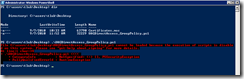
File C:\users\tluk\Desktop\UAGDirectAccess_GroupPolicy.ps1 cannot be loaded because the execution of scripts is disabled on this system. Please see “get-help about_signing” for more details.
At line:1 char:34
+ .\UAGDirectAccess_GroupPolicy.ps1 <<<<
+ CategoryInfo : Not specified: (:) [], PSSecurityException
+ FullyQualifiedErrorID : RuntimeException
Hello Mr. Problem! I remember you from my first Exchange 2010 deployment! Let’s set the permissions to remotesigned.
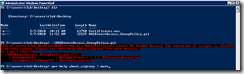


Now to execute the ps1 script.

PS C:\users\tluk\Desktop> .\UAGDirectAccess_GroupPolicy-bad.ps1
Unexpected token 'The' in expression or statement.
At C:\users\tluk\Desktop\UAGDirectAccess_GroupPolicy-bad.ps1:12 char:80
+ if (-not ${UAGDA_CERT_MACHINE_AUTH}) { ${UAGDA_CERT_MACHINE_AUTH}="C=US, O="The <<<< Go Daddy Group, Inc.", OU=Go Da
ddy Class 2 Certification Authority" }
+ CategoryInfo : ParserError: (The:String) [], ParseException
+ FullyQualifiedErrorId : UnexpectedToken
Not good right? So I open up the UAGDirectoAccess_GroupPolicy.ps1 script and see the following:
# UAGDA Group Policy Configuration Script.
# Generated on Tuesday, 07 September 2010 18:43 UTC.
# Generator Version 4.0.0.0
# Runtime variables
Param(
[parameter(Mandatory=$False, ValueFromPipeline=$true, HelpMessage="A domain controller, in domain.com for faster operations.")][String] $DomainControllerComputerName,
[parameter(Mandatory=$False, ValueFromPipeline=$true, HelpMessage="Additional domains(seperated by '') to link the app-server's policy to.")][String] $AdditionalAppServerDomains,
[parameter(Mandatory=$False, ValueFromPipeline=$true, HelpMessage="Additional domains(seperated by '') to link the client's policy to.")][String] $AdditionalClientDomains
)
# Static variables
if (-not ${UAGDA_ACCESS_ENABLING_ADDRESSES_ALL}) { ${UAGDA_ACCESS_ENABLING_ADDRESSES_ALL}="2002:480e:ae7c:8001::ac14:105,2002:480e:ae7c:8000:0:5efe:172.20.1.5,2002:480e:ae7c:8001::ac14:10a,2002:480e:ae7c:8000:0:5efe:172.20.1.10,2002:480e:ae7c:8001::ac14:108,2002:480e:ae7c:8000:0:5efe:172.20.1.8,2002:480e:ae7c:8001::ac14:172,2002:480e:ae7c:8000:0:5efe:172.20.1.114,2002:480e:ae7d::480e:ae7d" }
if (-not ${UAGDA_CERT_MACHINE_AUTH}) { ${UAGDA_CERT_MACHINE_AUTH}="C=US, O="The Go Daddy Group, Inc.", OU=Go Daddy Class 2 Certification Authority" }
if (-not ${UAGDA_CERT_TYPE}) { ${UAGDA_CERT_TYPE}="root" }
What I suspect is causing the problem is this:
if (-not ${UAGDA_CERT_MACHINE_AUTH}) { ${UAGDA_CERT_MACHINE_AUTH}="C=US, O="The Go Daddy Group, Inc.", OU=Go Daddy Class 2 Certification Authority" }
It almost looks like the extra quotes: O="The Go Daddy Group, Inc." was terminated the parsing of the string too early. With that being said, whenever I do any ldifde or csvde exports, I remember having to put quotes for OUs that had names with spaces so this does make sense. However, why wasn’t there quotes for: OU=Go Daddy Class 2 Certification Authority ?
At this point, I knew it had something to do with the quotes seeing how the error pointed the C=US, O="The <<<< as the error so what I ended up trying anyways was to take out the extra quotes, execute it from PowerShell and while it did run, it failed at:
So now let’s remove the quote leaving that section as:
if (-not ${UAGDA_CERT_MACHINE_AUTH}) { ${UAGDA_CERT_MACHINE_AUTH}="C=US, O=The Go Daddy Group, Inc., OU=Go Daddy Class 2 Certification Authority" }
Looking good:
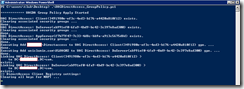

Sheesh… didn’t think I was that lucky. The red looks very bad:
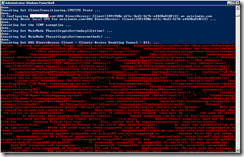
Executing Set UAG DirectAccess Client - Clients Access Enabling Tunnel - All. ... failed. CA name not specified Usage: add rule name=<string> endpoint1=anylocalsubnetdnsdhcpwinsdefaultgatew ay <IPv4 address><IPv6 address><subnet><range><list> endpoint2=anylocalsubnetdnsdhcpwinsdefault gateway <IPv4 address><IPv6 address><subnet><range><list> action=requireinrequestoutrequestinreques tout requireinrequireoutrequireinclearoutnoauthentication [description=<string>] [mode=transport
Great, so now I’ve made it a bit further into the execution but did I really make any progress? Through tracing the script, it didn’t look like there was progress because the line where the script seemingly fails is here:
# Setting ipsec DA tunnel rule
PsNetshExec "Set UAG DirectAccess Gateway - Clients Access Enabling Tunnel - All." "localhost" "advfirewall consec add rule name=```"UAG DirectAccess Gateway - Clients Access Enabling Tunnel - All```" description=```"Policies to enable access granting resources(DC, DNS, NAP, etc.) over IPsec. Generated on Thursday, 09 September 2010 14:11 UTC.```" mode=tunnel action=requireinrequireout profile=private,public localtunnelendpoint=```"${UAGDA_DTE_ACCESS}```" remotetunnelendpoint=```"any```" endpoint1=```"${UAGDA_ACCESS_ENABLING_ADDRESSES_ALL}```" endpoint2=```"any```" auth1=computercert auth1ca=```"${UAGDA_CERT_MACHINE_AUTH} catype:${UAGDA_CERT_TYPE}```" auth2=userntlm qmsecmethods=```"${UAGDA_IPSEC_QM_SECMETHODS}```" "
This PsNetSHExec command is calling variables and one of the variables it was calling was UAGDA_CERT_MACHINE_AUTH which we can also see is the line that we’ve been having problems with earlier:
${UAGDA_CERT_MACHINE_AUTH}="C=US, O="The Go Daddy Group, Inc.", OU=Go Daddy Class 2 Certification Authority" }
if (-not ${UAGDA_CERT_TYPE}) { ${UAGDA_CERT_TYPE}="root" } So now I’m back to where I was seeing how the error explicitly points out that there’s a problem with the CA specified:
Executing Set UAG DirectAccess Client - Clients Access Enabling Tunnel - All. ...
failed. CA name not specified Usage: add rule name=<string> endpoint1=anylocalsubnetdnsdhcpwinsdefaultgatew
ay <IPv4 address><IPv6 address><subnet><range><list> endpoint2=anylocalsubnetdnsdhcpwinsdefault
gateway <IPv4 address><IPv6 address><subnet><range><list> action=requireinrequestoutrequestinreques
This was when I went back to looking at the script and tried a few suggestions I got from the partner forum and isaserver.org forum here are the quotes:
James Jones:
You could try using double quotes or using a single quote before the double quotes as an escape character.
E.g.
if (-not ${UAGDA_CERT_MACHINE_AUTH}) { ${UAGDA_CERT_MACHINE_AUTH}="C=US, O=""The Go Daddy Group, Inc."", OU=Go Daddy Class 2 Certification Authority" }
or if (-not ${UAGDA_CERT_MACHINE_AUTH}) { ${UAGDA_CERT_MACHINE_AUTH}="C=US, O='"The Go Daddy Group, Inc."', OU=Go Daddy Class 2 Certification Authority" }
Cheers
JJ
---------------------------------------------------------------------------------------------
Brandon Jiang
Meanwhile, I performed some research on the information you posted, I agreed with you that it appears the issue was caused by the extra quotation mark (“ ”) in the subject name of this Go Daddy certificate.
if (-not ${UAGDA_CERT_MACHINE_AUTH}) { ${UAGDA_CERT_MACHINE_AUTH}="C=US, O="The Go Daddy Group, Inc.", OU=Go Daddy Class 2 Certification Authority" }
Sorry again for I don’t have any idea on UAG and this script. Is it possible for you to change this script and you may change “ to \” and have a try?
---------------------------------------------------------------------------------------------
Unfortunately, both didn’t work (thanks for the effort guys) and I continued to try every single variation I could think digging into my java programming and SQL query days in university:

So what do I know right now? I know that my colleague who originally ran into this problem earlier last week tried using our internal CA certificate and it worked but for some reason this Go Daddy certificate didn’t. I trust that this was true so opened up the Go Daddy and our internal Root certificate and compared them side by side. Unfortunately, the internal certificate we have does not have a space in the O= value (sorry, I can’t post a screenshot of it because internal IT wouldn’t like me doing it). This is when I went ahead and tried to use another certificate that had a space in the O= value as the certificate we’re using where the top is either the root or intermediate certificate you want to verify certificates sent to DirectAccess clients. The one I found was from Equifax:
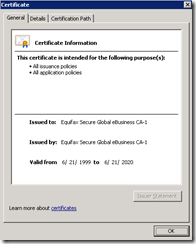
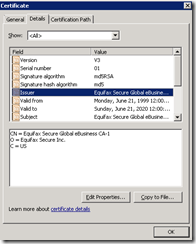
Coincidentally, and I’m sure the IT gods were helping, this certificate also had a period in the O= value which will trigger another hint as to what was causing the problem. For reference, here’s the Go Daddy certificate we’re having problems with:

So after assigning the Equifax certificate and running the wizard, I found that I did not run into the problem. I then went ahead to export the ps1 script, carefully look at the line and I can see that the format is exactly the same where there would be quotes to enclose the O= value. I then manually executed that script and the process completed successfully. YIKES!
I’m sure at this point many of you probably figured it out so long story short, the problem was the comma that was in the O= value for the Go Daddy certificate where we have:
O = The Go Daddy Group, Inc.
This was when I went ahead and changed the script to
# Static variables
if (-not ${UAGDA_ACCESS_ENABLING_ADDRESSES_ALL}) { ${UAGDA_ACCESS_ENABLING_ADDRESSES_ALL}="2002:480e:ae7a:8001::ac14:105,2002:480e:ae7a:8000:0:5efe:172.20.1.5,2002:480e:ae7a:8001::ac14:10a,2002:480e:ae7a:8000:0:5efe:172.20.1.10,2002:480e:ae7a:8001::ac14:108,2002:480e:ae7a:8000:0:5efe:172.20.1.8,2002:480e:ae7a:8001::ac14:172,2002:480e:ae7a:8000:0:5efe:172.20.1.114,2002:480e:ae7b::480e:ae7b" }
if (-not ${UAGDA_CERT_MACHINE_AUTH}) { ${UAGDA_CERT_MACHINE_AUTH}="C=US, O=The Go Daddy Group"," Inc., OU=Go Daddy Class 2 Certification Authority" }
if (-not ${UAGDA_CERT_TYPE}) { ${UAGDA_CERT_TYPE}="root" }
…which now encloses the comma with the quotes, executed the script and WOW, it finally completed! Here’s the short version:
O=The Go Daddy Group"," Inc.,
As simple as it was, this problem took me a total of 3 hours to figure out but I’m glad I got through it and it pretty much made my day in a good way!
UAG – 0
Terence – 1
:-)
Update:
I finally got extra cycles today to continue the UAG configuration and had a hard time finding the Activate button that the TechNet deployment guide keeps referring to. After clicking around the screen, the button is actually located on the top left hand corner:

Once you click on that button, you’ll see the following screen:

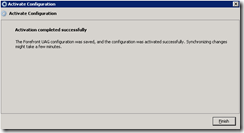
Once completed, you’ll see this window: