Pages

Tuesday, August 17, 2010

Unable to put ESX host back into “Evaluation Mode” licensing

I had to shuffle some licenses around a month ago for a client who used up their licenses for a preproduction environment but was ready to decommission those servers and move those licenses back over to the production UCS chassis’ blades. While trying to move those licenses from one blade on the preproduction chassis to another production chassis blade, I noticed that I wasn’t able to assign those preproduction blades’ license back to Evaluation Mode. Here’s what it looks like:

image

As shown in the above screenshot, the option of selecting Evaluation Mode has been grayed out.

I went ahead and VI Client-ed directly to the host to see if I was able to configure it there but got the same result:

image

image

image

Noticed the field Expires at the bottom of the window with the value label: Expired. I suspect that since the evaluation grace period has passed, VMware does not allow the user to change the mode back to evaluation. This makes sense and after doing some research on the internet, a lot of users in forums have said that this was probably why.

Resolution:

What I ended up doing was remove the preproduction blade from vCenter and was then able to reclaim the license for that host.

image

image

Friday, August 6, 2010

Communications Server 14 & Group Chat

One of the first questions asked on the first day during the introduction to CS 14 was if Group Chat has been updated and the answer is no. This is as of “beta refresh” so while things may change, it is highly improbable.

Thursday, August 5, 2010

Communications Server “14” Beta – “HTTP Error 401.2 – Unauthorized” when launching Control Panel

Here’s an error I ran into while working with CS 14 Beta:

1. Fresh install of CS 14.

2. Started all services.

3. Launched Communications Server Control Plane and got this page:

HTTP Error 401.2 – Unauthorized

You are not authorized to view this page due to invalid authentication headers.

image

To get the Control Panel to load:

1. Open up the Internet Options window and navigate to the Security tab.

image

2. Open up the Local Intranet sites.

3. Click on the Advanced button.

image

4. Add the page to the zone.

image image

5. Refresh the page and you’ll see that it loads now.

image

Not sure if this will be a problem in beta refresh or RTM but just in case it does, this would be something I’d try.

Wednesday, August 4, 2010

Communications Server 14 Beta services won’t start if DC & SQL is not available.

As noted in one of my previous posts: CS 14 configuration information redundancy between servers (http://terenceluk.blogspot.com/2010/08/cs-14-configuration-information.html), CS 14 was designed to be less dependent on the backend SQL server and domain controllers. For the backend SQL server, CS 14’s configuration data is stored in CMS which is replicated to each server so in the event of the server not able to reach the SQL backend server, the services will be able to find the configuration in its local SQL database. In regards to the dependency OCS 2007 R2 had on domain controllers, services are now ran as “Network Service” instead of domain accounts so there is no need to access a domain controller to start a service ran as a service account.

After getting all excited about this, I ran into a situation where the services stopped after losing connectivity to the DC and SQL and I wasn’t able to start the service. The training environment consists of 2 hosts with virtual machines being hosted on them. My partner was host1 which had the DC and SQL virtual machines while host2 (my lab machine) had the CS front-end server. Sometime during the afternoon, my partner disabled his NIC card that connected to the lab switch so he could use the wireless card to get on the internet. I did not know he did this and noticed that my MOC that was signed into a user account was signed out. Not knowing about the DC and SQL not being started, I went ahead and began troubleshooting and after reviewing the event logs, I realized it was simply because the CS front-end server cannot start because it cannot reach SQL.

Since I wasn’t certain whether something else was causing this, I went ahead and rebooted the CS front-end server a few times and found that this behavior was consistent. Here are the details:

1. I restart the CS 14 front-end server with DC and SQL server inaccessible. The services slowly tries to start:

image

2. I see the Front-End service showing the status of “Starting” then after a minute shows that it’s “Stopping”:
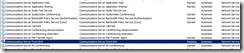
image

3. Reviewing the System logs, I can see that the front-end service terminates with a generic message (I’ve seen a similar one before in OCS 2007 R2):

The Communications Server Front-End service terminated with service-specific error %%-2147016646

image

4. Other errors are also found in the System log:

image

5. Interestingly enough, there were no errors found in the application logs:

image

6. Further drilling deeper into the Communications Server logs, I can see a lot more errors being logged:

The A/V Authentication Service cannot be contacted. Connections require Firewall traversal….

image

7. Here’s another error that is logged which doesn’t really tell us much:
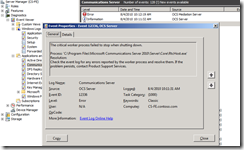
image

8. This error message is a bit better because I can immediately realize that the global catalog is not reachable by the front-end server:
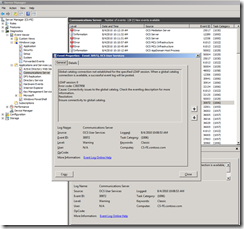
image

9. Here’s another error that is probably logged because the service it is referencing is dependent on another service that could not start:

image

10. Finally, this is the error message that explicitly says SQL is not reachable:

Event ID: 32134

Failed to connect to back-end database. Communications Server will continuously attempt to reconnect to the back-end. While this condition persists, incoming messages will receive error responses.

image

11. Here is an error complaining about the presence component:

image image image

I’m not sure exactly why but I’ve restarted the front-end server a few times all day with the DC and SQL turned off but could not get the services up. I’ve asked the 2 instructors about this, 1 said they’re supposed to start and never offered to look (he didn’t seem interested) and the other said it should start but when I asked him to come over to have a look he said he needed to do the next presentation (fair enough) but never said he’ll have a look.

I don’t like push people to look at something if they’re not interested so I’m going to assume the following:

1. There is something wrong with these virtual machines and something else is causing this.

2. This is beta (not beta refresh), so certain features are buggy.

3. When CS 14 actually RTMs, I will build this in my own environment to test it again myself.

Tuesday, August 3, 2010

Supported Scenarios: Migrating to CS 14 from earlier versions of OCS/LCS

Day 2 – Module 06

Migration restrictions:

1. Tri-mode is not supported. You cannot have R1, R2 in your environment when you migrate to CS 14.

2. LCS to CS 14 is not supported. You will need to migrate to OCS R1 or R2 first.

3. R1 to CS 14 OR R2 to CS 14 is supported.

CS 14 configuration information redundancy between servers

Day 1 – Module 04

As many beta documents have pointed out, CS 14’s server configuration is now replicated between servers so each has a local copy within SQL Express (every server installs this by default now). This replication allows services to start even if it loses Active Directory connectivity.

So how does this work? Apparently flat file XML blogs are zip-ed up and gets pushed to other servers. I asked about what type of traffic these files are distributed in and it’s apparently just SMB port 445 traffic and not some fancy SQL replication. Edge is different because it’s usually in the DMZ and so is pushed out via HTTPS 443. This obviously means that the certificate on the Edge server is important and requires to be valid.

Rewriting calling and called number in CS 14

You are now able to manipulate the number going out via a, say Redmond or Toronto gateway such as the following example:

User calls +4165555555 to translate this to +14165555555 if it’s going to be sent out the Redmond gateway OR translate this to just +4165555555 if it’s going out the Toronto gateway.

However, you still cannot make any modifications to the calling number in CS 14 based on what was discussed in class.