Ran into an interesting failure while testing a newly deployed OCS 2007 R2 Edge server on a Windows Server 2008 R2 64-bit server that I thought was worth a blog post because what ended up fixing it seemingly had nothing to do with the error message. First off, I actually made the mistakes of selected 5061 as the port instead of 443 which was what I intended to do. The reason why I made this mistakes was:
- I did not select the auto discovery option because the ISP managed to incorrectly create the public SRV records 3 times.
- I didn’t pay attention while manually entering the settings.
Though I had selected the wrong port, I did learn something out of this and it was one of the many reasons that could possibly cause https://www.testocsconnectivity.com/ to throw the error message:
“Testing SSLCertificate for validity.”
Problem
You use https://www.testocsconnectivity.com/ to test your newly deployed OCS 2007 R2 Edge server but run into the following results:

| Connectivity Test Failed |
| Test Details | Copy to Clipboard | Expand/Collapse | | 
| Testing the Remote Connectivity of user tluk@domain.com. | | Specified Remote Connectivity test(s) failed. Please examine below details of specific reason for failure. | 
| Test Steps | | 
| Attempting to Resolve the host name sip.domain.com in DNS. | | | Host successfully Resolved | 
| Additional Details | | | IP(s) returned: 99.333.181.44 |
| ![clip_image004[1]](https://blogger.googleusercontent.com/img/b/R29vZ2xl/AVvXsEhP1NCuzoBklOKMyofOxy_ndnYUpJN5dKCLE_U5_od_UzNylu3PufOqDrlP79uNzDvk01v3dIbwzuWpJYVqAF0WZ2WHtrjeEnezgF-u6-Tp5owohZLVjgzDFlg5tnC0xW4xrYUlLZtnofCi/?imgmax=800 "clip_image004[1]")
| Testing TCP Port 5061 on host sip.domain.com to ensure it is listening/open. | | | The port was opened successfully. |
| ![clip_image002[1]](https://blogger.googleusercontent.com/img/b/R29vZ2xl/AVvXsEgzPC2nxl_0EfZxjs_WUcLoE0gqn5Z_oBH0rth4IrExiblqECUCf9NozV2519qiKmidq0YU7bwQvdh_ORebvW8gP25W4L_M8-LpNWWNa46WfgxcPR3S2srOr5QBpXpMael3Tfn6fF3sevr0/?imgmax=800 "clip_image002[1]")
| Testing SSLCertificate for validity. | | | The SSLCertificate failed one or more certificate | | | | ![clip_image003[1]](https://blogger.googleusercontent.com/img/b/R29vZ2xl/AVvXsEjk4bprOpqUOSYxSNJOnixvnPGmixoM9qZcV5w7fgV678LDEvC70ntOzObrFyY-pZ4LZk8MgT1NmQWg7Dn1qtkP8RLWCWzU40JmzfK3NeDGdzrdWkm-66xZTvLpvkec4IIrW_aZxKc1PJjA/?imgmax=800 "clip_image003[1]")
| Additional Details | | | A network connection error occured while communicating with the remote host: Exception Details: Message: Unable to read data from the transport connection: An existing connection was forcibly closed by the remote host. Type: System.IO.IOException Stack Trace: at System.Net.Sockets.NetworkStream.Read(Byte[] buffer, Int32 offset, Int32 size) at System.Net.FixedSizeReader.ReadPacket(Byte[] buffer, Int32 offset, Int32 count) at System.Net.Security.SslState.StartReadFrame(Byte[] buffer, Int32 readBytes, AsyncProtocolRequest asyncRequest) at System.Net.Security.SslState.StartReceiveBlob(Byte[] buffer, AsyncProtocolRequest asyncRequest) at System.Net.Security.SslState.CheckCompletionBeforeNextReceive(ProtocolToken message, AsyncProtocolRequest asyncRequest) at System.Net.Security.SslState.StartSendBlob(Byte[] incoming, Int32 count, AsyncProtocolRequest asyncRequest) at System.Net.Security.SslState.ProcessReceivedBlob(Byte[] buffer, Int32 count, AsyncProtocolRequest asyncRequest) at System.Net.Security.SslState.StartReadFrame(Byte[] buffer, Int32 readBytes, AsyncProtocolRequest asyncRequest) at System.Net.Security.SslState.StartReceiveBlob(Byte[] buffer, AsyncProtocolRequest asyncRequest) at System.Net.Security.SslState.CheckCompletionBeforeNextReceive(ProtocolToken message, AsyncProtocolRequest asyncRequest) at System.Net.Security.SslState.StartSendBlob(Byte[] incoming, Int32 count, AsyncProtocolRequest asyncRequest) at System.Net.Security.SslState.ForceAuthentication(Boolean receiveFirst, Byte[] buffer, AsyncProtocolRequest asyncRequest) at System.Net.Security.SslState.ProcessAuthentication(LazyAsyncResult lazyResult) at System.Net.Security.SslStream.AuthenticateAsClient(String targetHost, X509CertificateCollection clientCertificates, SslProtocols enabledSslProtocols, Boolean checkCertificateRevocation) at System.Net.Security.SslStream.AuthenticateAsClient(String targetHost) at TestOCSConnectivity.Tests.SSLCertificateTest.PerformTestReally() Exception Details: Message: Unable to read data from the transport connection: An existing connection was forcibly closed by the remote host. Type: System.IO.IOException Stack Trace: at System.Net.Sockets.NetworkStream.Read(Byte[] buffer, Int32 offset, Int32 size) at System.Net.FixedSizeReader.ReadPacket(Byte[] buffer, Int32 offset, Int32 count) at System.Net.Security.SslState.StartReadFrame(Byte[] buffer, Int32 readBytes, AsyncProtocolRequest asyncRequest) at System.Net.Security.SslState.StartReceiveBlob(Byte[] buffer, AsyncProtocolRequest asyncRequest) at System.Net.Security.SslState.CheckCompletionBeforeNextReceive(ProtocolToken message, AsyncProtocolRequest asyncRequest) at System.Net.Security.SslState.StartSendBlob(Byte[] incoming, Int32 count, AsyncProtocolRequest asyncRequest) at System.Net.Security.SslState.ProcessReceivedBlob(Byte[] buffer, Int32 count, AsyncProtocolRequest asyncRequest) at System.Net.Security.SslState.StartReadFrame(Byte[] buffer, Int32 readBytes, AsyncProtocolRequest asyncRequest) at System.Net.Security.SslState.StartReceiveBlob(Byte[] buffer, AsyncProtocolRequest asyncRequest) at System.Net.Security.SslState.CheckCompletionBeforeNextReceive(ProtocolToken message, AsyncProtocolRequest asyncRequest) at System.Net.Security.SslState.StartSendBlob(Byte[] incoming, Int32 count, AsyncProtocolRequest asyncRequest) at System.Net.Security.SslState.ForceAuthentication(Boolean receiveFirst, Byte[] buffer, AsyncProtocolRequest asyncRequest) at System.Net.Security.SslState.ProcessAuthentication(LazyAsyncResult lazyResult) at System.Net.Security.SslStream.AuthenticateAsClient(String targetHost, X509CertificateCollection clientCertificates, SslProtocols enabledSslProtocols, Boolean checkCertificateRevocation) at System.Net.Security.SslStream.AuthenticateAsClient(String targetHost) at TestOCSConnectivity.Tests.SSLCertificateTest.PerformTestReally() |
|
|
|
|
|
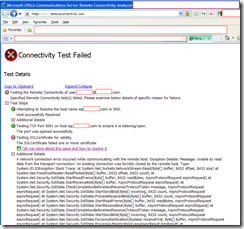
As I noted above, this can be caused by other reasons and the following is only one of the reasons.
Solution
What I found was that the edge servers weren’t defined in the Edge Servers tab in the Office Communications Server Global properties.

Once I filled in the servers, this error from https://www.testocsconnectivity.com/ (Microsoft Office Communications Server Remote Connectivity Analyzer) went away.

I found this extremely strange because the error referenced the SSL certificate yet this didn’t seem like something that would cause such an error.


![clip_image004[1]](https://blogger.googleusercontent.com/img/b/R29vZ2xl/AVvXsEgTCZcrGlMhyphenhyphenpA3CEHEZWqtuTum9Ve4rVrtJQ3V3rl2hd0F7qsS2bmlhSdKtcEaqHx-7W3WfKrVeggzWnbYigOasQmLXr_4UVrIbbvXKPydEkmn8P5LWDA-a1yuvaKaVZiAE1hvbMkPN5Je/s1600-h/clip_image00412.gif "clip_image004[1]")
![clip_image002[1]](https://blogger.googleusercontent.com/img/b/R29vZ2xl/AVvXsEiUv0cJKZdWObxc8fCRIkBAbg_8gZCu2Dmqa0SD4wJPUTjNX5aTCbBIrr6SlfjqW_TgOLD5WwMo_7mlGxtpT8imHGkXoOIhyphenhyphengd0ZEVhiuFsw6P1U4T5e4lDRnS6XoP5687NSQFhh6WAA7eI/s1600-h/clip_image00212.gif "clip_image002[1]")

![clip_image003[1]](https://blogger.googleusercontent.com/img/b/R29vZ2xl/AVvXsEgCgxb0NOiq8iR47Kyge2g5lefMomanjLzHgXq5Am1uS8JFqHcPdmq83eW9gYiRZc-KZWqprlSQgGJZfCWskI1ktMS8WjzhuV22sZa-I-kXg_QbvVLF2d37-Ur3ViuKgzjDEaZ9h5_J9JKy/s1600-h/clip_image00312.gif "clip_image003[1]")


No comments:
Post a Comment