Pages

Sunday, December 4, 2011

Installing VMware vCenter 5.0 on a Windows Server 2008 R2

While installing VMware vCenter 5.0 on a Windows Server 2008 R2 isn’t very exciting, I had to document one of my installs earlier last week so while it doesn’t differ too much from 4.x, I thought I’d take the screenshots I took and write a blog post in case anyone wants to see what it looks like.

Download and double click on the autorun file:

image

Once the VMware vCenter Installer launches, proceed with selecting vCenter Server and click on install:

Note that I ran this install on a Windows Server 2008 R2 64-bit w/SP1 server and it was not necessary for me to manually install the Prerequisites:

1. Microsoft .NET 3.5 SP1
2. Windows Installer 4.5

image

The installer for vCenter 5.0 will now launch:

image

image

image

image

Agree to the EULA:

image

Type in the appropriate values for the fields:

image

As with vCenter 4.x, you’ll have the option of using a local SQL install or a full blown remote SQL server:

image

You can choose to use a local or domain service account or the SYSTEM Account to run the service:

image

Note that if you don’t have a DNS entry for your host or if the server is unable to contact a DNS to verify that a record has been created for its name, you’ll receive the following warning:

The Fully Qualified Domain Name cannot be resolved. If you continue the installation, some features might not work correctly. For detailed requirements, see the vSphere Installation Setup guide.

image

Proceed with the install:

image

image

image

image

image

image

image

image

Notice that if you chose to use a local SQL instance as your database, the installer will launch the SQL Server 2008 R2 installer:

image

image

image

image

Once the installation of the local instance of SQL completes, the installer will proceed with the vCenter components:

image

image

image

image

image

image

image

image

image

image

image

image

… and we’re done.

Thursday, December 1, 2011

Modifying load balancing policy for a vSwitch on ESXi 5.0

It’s been such a busy 2 months for me over here that I just realized I’ve written 5 posts in October 2011 and 3 posts in November 2011.  My draft items in my Outlook which I use to keep notes for blog posts is now at 102 items!  December looks to be another busy month but I’ve made a promise to myself that I’ll dedicate some time over the following weeks to catch up on my blogs.  Now that I’ve made my rant, let’s get on with the reason why I’m writing this post and the usual solution to my problem.

I’m currently working on a project for a hosting company to upgrade their vSphere 4 ESXi 4.1 hosts to vSphere 5 ESXi 5.0 and instead of performing an in-place upgrade, we decided to just do overwriting fresh installs on each host one after another.  The challenge I ran into was that these blades has all traffic (management, VMotion, VM traffic, etc) traversing through 1 x Intel X520-T2 with 2 x 10Gbps ports.  Since the switches have already been configured with port-channeling, the server did not have network connectivity after the fresh install of ESXi 5.0.  This set me on a search for the commands to modify the default vSwitch 0 load balancing policy to Route based on IP Hash. 

While the search did not take long and the information was available through VMware KB articles, I thought I’d write this post to include the commands so I can reference it in the future:

Command to modify vSwitch 0 to Route based on the originating virtual switch port ID

vim-cmd /hostsvc/net/vswitch_setpolicy --nicteaming-policy='loadbalance_srcid' vSwitch0

Command to modify vSwitch 0 to Route based on source MAC hash

vim-cmd /hostsvc/net/vswitch_setpolicy --nicteaming-policy='loadbalance_srcmac' vSwitch0

Command to modify vSwitch 0 to Route based on IP hash

vim-cmd /hostsvc/net/vswitch_setpolicy --nicteaming-policy='loadbalance_ip' vSwitch0

Command to modify vSwitch 0 to Use explicit failover order

vim-cmd /hostsvc/net/vswitch_setpolicy --nicteaming-policy='failover_explicit' vSwitch0

--------------------------------------------------------------------------------------------------------------------------------------------------------------------

Reference VMware KB Articles:

Changing the load balancing policy in ESXi using Tech Support Mode:
http://kb.vmware.com/selfservice/microsites/search.do?language=en_US&cmd=displayKC&externalId=1011520

Specifying the NIC teaming policy from the command line in ESX 4.0:
http://kb.vmware.com/selfservice/microsites/search.do?language=en_US&cmd=displayKC&externalId=1019864

Thursday, November 3, 2011

Troubleshooting and validating Public Folder replication

I think I’ve still been averaging at least 2 to 3 Exchange 2003 to 2007 or 2010 migrations ever since the latter versions were released and while performing a migration a few months ago, I ran into an issue with the organization’s public folders.  To make a long story short, there were some corrupted items in the Exchange 2003 public folder store that weren’t replicating over to the new Exchange 2010 public store.  In order to further troubleshoot, I had to turn on diagnostic logging.  Seeing how I’ll most likely come across this problem again, I thought I should write a post so I have something to reference to in the future.

Turning on Diagnostics Logging on Exchange 2003

The logging you should be turning on for Exchange 2003 are as follows:

  • MSExchangeIS
    • Public Folder
      • Replication Incoming Messages - Maximum
      • Replication Outgoing Messages - Maximum
      • Non-delivery Reports - Maximum
      • Replication Backfill - Maximum
      • Replication General - Maximum

image

image

image

image

Turning on Diagnostics Logging on Exchange 2010

The logging you should be turning on for Exchange 2010 are as follows:

  • MSExchangeIS
    • 9001 Public
      • Replication Backfill - High
      • Replication Errors - Medium
      • Replication General - High
      • Replication Incoming Messages - High
      • Replication NDRs - High
      • Replication Outgoing Messages - High

image

image

image

image

image

image

image

image

Reviewing event logs

With these new logging levels turned on for Exchange 2003 and 2010, open up the Application Logs in the Event Viewer and look for events logged by the source MSExchangeIS Public Store with event IDs:

  • 3030
  • 3038
  • 3018
  • 3027

These events will inform you of the incoming and outgoing replication for the public folders.

Exchange 2003 Event Viewer Logs

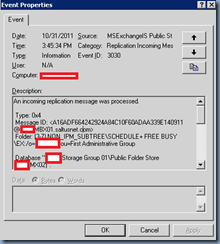
The following are some sample events logged on the Exchange 2003 server:
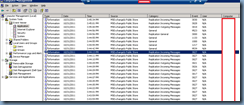
image

An incoming replication message was processed.

Type: 0x4
Message ID: <A16ADF664242924A84C10F60ADAA339E140911@CONMBX01.Contosonet.com>
Folder: (3-7) NON_IPM_SUBTREE\SCHEDULE+ FREE BUSY\EX:/o=Contoso/ou=First Administrative Group

Database "Contoso Storage Group 01\Public Folder Store (CONMX02)".
CN min: 9-134D58
CN max: 9-134D5D
MIDs: 3
1: 6-ADF5, 9-134D59
--- : USER-/CN=RECIPIENTS/CN=NCHICHON : 9/1/2005 6:37:14 PM
2: 6-D54C6, 9-134D5B
--- : USER-/CN=RECIPIENTS/CN=PPHILLIPS : 8/1/2010 3:00:40 AM
3: 6-D543B, 9-134D5D
--- : USER-/CN=RECIPIENTS/CN=KGANGWANI : 9/4/2008 4:28:25 PM

MIDSET deleted: {0}

Server: /o=Contoso/ou=Exchange Administrative Group (FYDIBOHF23SPDLT)/cn=Configuration/cn=Servers/cn=CONMBX01/cn=Microsoft Public MDB

For more information, click http://www.microsoft.com/contentredirect.asp.
image

An incoming replication message was processed.

Type: 0x2
Message ID: <A16ADF664242924A84C10F60ADAA339E13F970@CONMBX01.Contosonet.com>
Database "Contoso Storage Group 01\Public Folder Store (CONMX02)".
CN min: 9-1339D7
CN max: 9-13F96F
RFIs: 1
1) FID: 2-FFFFFFFF0003, PFID: 1-1, Offset: 28
    IPM_SUBTREE\Internet Newsgroups

IDCN deleted:  {0}

Server: /o=Contoso/ou=Exchange Administrative Group (FYDIBOHF23SPDLT)/cn=Configuration/cn=Servers/cn=CONMBX01/cn=Microsoft Public MDB

For more information, click http://www.microsoft.com/contentredirect.asp.

image

Exchange 2010 Event Viewer Logs

The following are some sample events logged on the Exchange 2010 server:
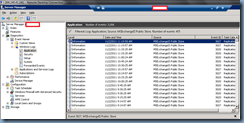
image

An incoming replication message was processed.

Type: 0x20
Message ID: <E33478DC5F0A9540B407A390FDA70DFD1B43B6@CONmx02.Contosonet.com>
Database "Public Folder Store".
Folder(s): (9-265AB) IPM_SUBTREE\Contoso School Calendar

Server: /o=Contoso/ou=First Administrative Group/cn=Configuration/cn=Servers/cn=CONMX02/cn=Microsoft Public MDB

image

An outgoing replication message was issued.

Type: 0x4
Message ID: <A16ADF664242924A84C10F60ADAA339E1479DA@CONMBX01.Contosonet.com>
Folder: (7-7) NON_IPM_SUBTREE\SCHEDULE+ FREE BUSY\EX:/o=Contoso/ou=First Administrative Group

Database "Public Folder Store". CN min: 1-140BF6, CN max: 1-140C0C
Message IDs: 11
  1: 9-ACBD, 1-140BF7
--- : USER-/CN=RECIPIENTS/CN=SQUERY : 11/2/2004 8:27:38 PM
2: 9-AD4B, 1-140BF9
--- : USER-/CN=RECIPIENTS/CN=STUFTS : 2/8/2005 12:28:01 PM
3: 9-D5420, 1-140BFB
--- : USER-/CN=RECIPIENTS/CN=WASTWOOD : 4/7/2008 12:49:13 PM
4: 9-ADF8, 1-140BFD
--- : USER-/CN=RECIPIENTS/CN=DDORRINGTON : 9/1/2005 6:54:48 PM
5: 9-AA77, 1-140BFF
--- : USER-/CN=RECIPIENTS/CN=TFIGUERIDO : 9/2/2003 5:08:52 PM
6: 6-3BF0, 1-140C01
--- : USER-/CN=RECIPIENTS/CN=JBEARD : 7/9/2001 2:40:53 PM
7: 6-3BEE, 1-140C03
--- : USER-/CN=RECIPIENTS/CN=MDURRANT : 7/3/2001 2:20:47 PM
8: 6-3BFF, 1-140C05
--- : USER-/CN=RECIPIENTS/CN=CBARNES : 9/18/2001 1:43:37 PM
9: 6-3BE7, 1-140C07
--- : USER-/CN=RECIPIENTS/CN=TBUCHER : 6/27/2001 6:59:19 PM
10: 9-D54D0, 1-140C09
--- : USER-/CN=RECIPIENTS/CN=KPACHECO : 9/1/2010 11:17:23 AM
11: 1-143A72, 1-140C0C
--- : USER-/CN=RECIPIENTS/CN=ATROTT2 : 11/2/2011 2:14:08 PM

MIDSET Deleted:  {0}
Server:
 

image

Wednesday, November 2, 2011

Cannot expand public folders after migrating from Exchange 2003 to 2010

Problem

You’ve completed migrating all of your users’ mailboxes from Exchange 2003 to 2010 and used the PowerShell scripts to configure replicas of the legacy Exchange server to your new Exchange 2010 server.  The replicas were moved after you’ve verified that all of the folders were replicated over but as soon as you shut down your Exchange 2003 services, your users are no longer able to expand the Public Folder tree.  The error message in Outlook reads:

Cannot expand the folder. Microsoft Exchange is not available. Either there are network problems or the Exchange computer is down for maintenance. (/o=Contoso/ou=First Administrative Group/cn=Configuration/cn=Servers/cn=exchange2k3Server)

image

Solution

Note that this issue can be caused by many reasons and while troubleshooting this a few months back, I checked everything aside from the simplest setting which is why I’m writing this post.

One of the first setting to check is the Default public folder database setting for your Exchange 2010 information store so open the Exchange Management Console –> Microsoft Exchange –> Organization Configuration –> Mailbox then right click on your store and select properties:

image

Navigate to the Client Settings tab and make sure your Default public folder database is set to your new Exchange 2010 server:

image

image

image

Once you have this setting configured appropriately, you’ll need to wait till the settings have replicated across your domain controllers and once they have, you should now be able to browse the public folders.

Applying permissions to public folders in Exchange 2010

I was recently ask by a client about how they could apply permissions for a specific user to all of their existing public folders without having to manually set them via Outlook.  The easy answer was that PowerShell could probably do it but since I don’t live and breath PowerShell on a daily basis, a bit a research and testing was required.  I know I’ll most likely get asked again in the future so just so I have something to reference to, I figure I’ll blog it:

Giving Access

Get-Publicfolder "\" -recurse | Add-PublicFolderClientPermission -User username -AccessRights Owner -Server serverName

Removing Access

Get-Publicfolder "\" -recurse | Add-PublicFolderClientPermission -User username -AccessRights None -Server serverName

For more information about the Get-Publicfolder cmdlet, see the following article: http://technet.microsoft.com/en-us/library/bb124743.aspx